
| 일 | 월 | 화 | 수 | 목 | 금 | 토 |
|---|---|---|---|---|---|---|
| 1 | 2 | 3 | 4 | 5 | 6 | |
| 7 | 8 | 9 | 10 | 11 | 12 | 13 |
| 14 | 15 | 16 | 17 | 18 | 19 | 20 |
| 21 | 22 | 23 | 24 | 25 | 26 | 27 |
| 28 | 29 | 30 |
- Spring Container
- redis
- docker
- AWS
- 지연 로딩
- securitycontextholderfilter
- 서블릿 컨테이너
- DLQ
- dockerhub
- 페이징
- @ComponentScan
- Routing Key
- mybatis
- docker compose
- Spring Data JPA
- JdbcTemplate
- JPA
- JPQL
- 스프링 부트
- Dead Letter Queue
- Spring
- DI
- MSA
- JWT
- CORS
- @Transactional
- Web
- 쿠버네티스
- 컨테이너
- kafka
- Today
- Total
look-forest
CORS(Cross-Origin Resource Sharing) 설정 본문
CORS(Cross-Origin Resource Sharing)란?
웹 브라우저가 다른 도메인 간의 리소스 요청을 안전하게 처리할 수 있도록 돕는 메커니즘이다.
CORS는 웹 애플리케이션이 브라우저에서 자바스크립트를 통해 다른 도메인에서 리소스를 요청할 때, 해당 요청이 허용될지 여부를 서버 측에서 결정할 수 있도록 한다.
※ 왜 백엔드 서버 측에서 결정할까? 왜 설정을 서버에다 할까?
- 클라이언트 측(브라우저) 자바스크립트 코드에 설정된 CORS 정책은 클라이언트 소스 코드를 수정하는 것으로 우회할 수 있다.
- 서버 측에서 CORS 설정을 관리하면, 서버의 데이터를 신뢰할 수 있는 출처에만 제공하기 위해 합법적인 요청인지 확인해 데이터 보안이 가능하며 접근 허용 정책을 중앙에서 통제할 수 있다.
- 그렇지만 백엔드 서버가 신뢰할 수 없는 악의적인 사이트일 수 있으므로, CORS 설정 자체가 클라이언트의 보안을 완벽하게 보장해주지는 않는다. 따라서 클라이언트 애플리케이션은 신뢰할 수 없는 출처로부터 데이터를 요청하거나 스크립트를 로드하지 않는 등 대비가 필요하다.
CORS의 개념
- 출처: URL을 구성하는 프로토콜, 호스트, 포트의 조합
- 교차 출처 요청: 하나의 출처에서 실행 중인 웹 애플리케이션이 다른 출처의 리소스에 접근하고자 하는 요청
기본 원리
- 프리플라이트 요청
특정 메서드를 사용하거나 사용자 정의 헤더를 사용하는 경우 브라우저는 실제 요청을 보내기 전에 OPTIONS 메서드를 사용하여 서버에 사전 요청을 보낸다. 이를 통해 서버가 실제 요청을 허용할지 결정할 시간을 준다. - 단순 요청
GET, POST, HEAD 중 하나의 메서드를 사용하고 사용자 정의 헤더를 포함하지 않는 경우 프리플라이트 요청 없이 바로 요청을 보낼 수 있다.
서버 측 설정
서버는 응답 헤더를 통해 클라이언트가 요청을 허용할지 여부를 알려준다. 주요 헤더는 다음과 같다.
- Access-Control-Allow-Origin: 요청을 허용할 도메인을 지정
- Access-Control-Allow-Methods: 허용할 HTTP 메서드를 지정
- Access-Control-Allow-Headers: 허용할 요청 헤더를 지정
- Access-Control-Allow-Credentials: 자격 증명(쿠키, 인증 정보 등)을 포함한 요청을 허용할지 여부를 지정
import org.springframework.context.annotation.Bean;
import org.springframework.context.annotation.Configuration;
import org.springframework.web.servlet.config.annotation.CorsRegistry;
import org.springframework.web.servlet.config.annotation.WebMvcConfigurer;

@Configuration
public class MyWebConfig implements WebMvcConfigurer {

    @Override
    public void addCorsMappings(CorsRegistry registry) {
        registry.addMapping("/**")
                .allowedOrigins("http://example.com")
                .allowedMethods("GET", "POST", "PUT", "DELETE")
                .allowedHeaders("*")
                .allowCredentials(true);
    }
}
Spring Security를 사용할 경우 CORS 설정
CORS는 브라우저에서 클라이언트가 다른 도메인으로 요청할 때 적용되는 보안 정책이다.
따라서 서버 간의 통신, 즉 내 애플리케이션이 내부적으로 외부 API를 호출하는 경우에는 CORS 설정이 적용되지 않는다.
즉, REST API 서버든 뭐든, 브라우저가 호출한다면 CORS 설정이 필요하다.
Spring Security를 사용한다면, WebMVC 설정과 Spring Security 설정을 모두 해야 한다.
Spring Security가 자체적으로 CORS 요청을 차단할 수 있기 때문이다.
1. addCorsMappings (WebMvcConfigurer)
- Spring MVC에서 CORS를 처리하는 설정
- Spring 컨트롤러(@RestController)로 들어오는 CORS 요청을 허용하거나 제한
- Spring Security 없이도 작동
2. Spring Security CORS 설정
- Spring Security는 보안 필터를 통해 HTTP 요청을 가로채기 때문에,
별도로 CORS를 허용하지 않으면 Spring Security가 CORS 요청을 차단
주의 사항
JWT 등을 사용할 경우, 자격 증명(쿠키, 인증 헤더 등)을 허용하도록 설정해야 한다.
.allowCredentials(true) 를 활성화하면 브라우저가 클라이언트의 자격 증명을 포함하여 요청을 보낼 수 있게 된다.
그러나 이와 동시에 allowedOrigins("*") 를 설정하면 문제가 발생한다. *(와일드카드)가 모든 출처를 허용하지만, 자격 증명을 허용하는 경우 브라우저가 와일드카드와 함께 작동하지 않기 때문이다.
따라서 allowedOrigins("*") 대신 허용할 특정 도메인(예: http://example.com)을 명시적으로 설정하거나,
allowedOriginPatterns() 를 사용해 정규식으로 여러 Origin을 유연하게 허용한다.
백엔드 설정 코드
@Configuration
public class CorsMvcConfig implements WebMvcConfigurer {

    @Override
    public void addCorsMappings(CorsRegistry registry) {
        registry.addMapping("/**")
                .allowCredentials(true)
                .allowedOriginPatterns("http://localhost:*");
                // 클라이언트에서 자격 증명(쿠키,인증헤더) 요청 허용 설정하면 반드시 특정 Origin을 명시하거나 allowedOriginPatterns()를 사용해야 한다.
                //.allowedOrigins("*")
    }
}
@Configuration
@EnableWebSecurity
public class SecurityConfig {

    @Bean
    public SecurityFilterChain securityFilterChain(HttpSecurity http) throws Exception {
        http
                .cors(auth -> auth.configurationSource(corsConfigurationSource()));

        return http.build();
    }

    public CorsConfigurationSource corsConfigurationSource() {
        CorsConfiguration configuration = new CorsConfiguration();
        configuration.setAllowCredentials(true); //클라이언트에서 자격 증명(쿠키,인증헤더) 요청 허용. 설정하면 반드시 특정 Origin을 명시하거나 allowedOriginPatterns()를 사용
        configuration.setAllowedOriginPatterns(Collections.singletonList("http://localhost:*")); //모든 IP 주소 허용 (원래는 프론트엔드 IP만 허용)
        configuration.setAllowedHeaders(Collections.singletonList("*"));
        configuration.setAllowedMethods(Collections.singletonList("*"));
        configuration.setMaxAge(3600L);
        configuration.setExposedHeaders(Collections.singletonList("Authorization")); //브라우저가 JS에 해당 응답 헤더를 노출해줌

        UrlBasedCorsConfigurationSource source = new UrlBasedCorsConfigurationSource();
        source.registerCorsConfiguration("/**", configuration);
        return source;
    }
}
※ setExposedHeaders 설정하지 않으면 JS가 응답의 Authorization 헤더 값을 읽을 수 없다.
프론트 단 예시 코드와 브라우저 확인 방법
<html>
<head>
    <meta http-equiv="Content-Type" content="text/html;charset=UTF-8">
    <title>Document</title>
</head>
<body>
    <h1>로그인 페이지</h1>
    <hr>
    <form>
        <input type="text" id="username"><br/>
        <input type="password" id="password"><br/>
        <button type="button" onclick="login()">로그인</button>
    </form>

    <script>
        //async : await 지점을 기억한 채로 login 함수의 스택을 빠져나옴
        async function login(){
            let userDto = {
                username:document.querySelector("#username").value,
                password:document.querySelector("#password").value
            };
            console.log(userDto);

            let userJson = JSON.stringify(userDto);
            console.log(userJson);

            let r1 = await fetch("http://localhost:8081/api/login", {
                method:"post",
                body:userJson,
                headers:{
                    "Content-Type":"application/json; charset=utf-8"
                }
            });
            console.log("Authorization", r1.headers.get("Authorization"));
            let token = r1.headers.get("Authorization");
            localStorage.setItem("token", token);
            sessionStorage.setItem("token", token);

            let r2 = await r1.json();
            console.log(r2);
        }
        //async 라서 빠져나옴 -> login 함수 내부에 있는 값들을 메모리에 복사해둬야 함 (캡처링)
    </script>
</body>
</html>
Preflight 요청
브라우저에서 보안상의 이유로 CORS(Cross-Origin Resource Sharing) 요청을 처리하기 전에 서버와 확인하는 과정.
이는 서버가 클라이언트의 실제 요청을 허용할 준비가 되었는지 확인하기 위해 미리 보내는 요청이다.
- HTTP OPTIONS 메서드로 전송
- 브라우저가 자동으로 생성
- 서버의 CORS 정책 확인

Preflight 요청 발생 조건
Preflight 요청은 클라이언트 요청이 "심플 요청"이 아닐 때 발생한다.
심플 요청의 조건:
- HTTP 메서드: GET, POST, 또는 HEAD 메서드만 허용
- 헤더: 클라이언트가 사용하는 헤더는 다음에 해당해야 한다.
- Accept
- Accept-Language
- Content-Language
- Content-Type (값이 application/x-www-form-urlencoded, multipart/form-data, 또는 text/plain인 경우만 허용)
- CORS 정책 위반 여부:
- 요청이 동일한 도메인, 포트, 프로토콜에서 이루어지지 않는 경우 CORS 규칙을 따라야 한다.
- 자격 증명(쿠키나 인증 정보 등)이 포함된 경우도 Preflight가 발생할 수 있다.
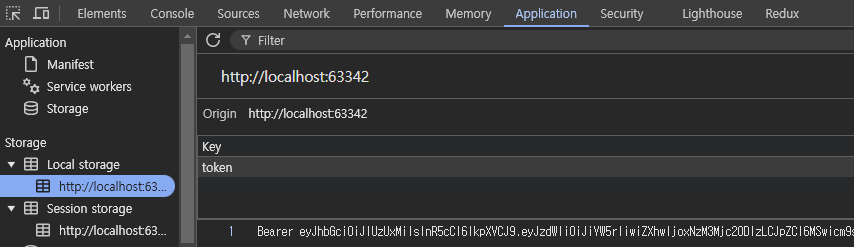
Local / Session Storage
Local / Session Storage에 저장되었는지 확인하는 방법
'Spring > Spring 기반 REST API 개발' 카테고리의 다른 글
| API 구현 2 - HATEOAS 적용 (0) | 2024.10.26 |
|---|---|
| HATEOAS와 Self-Descriptive Message 적용 (2) | 2024.10.25 |
| API 구현 예시와 팁 (0) | 2024.10.22 |
| REST API와 HATEOAS (0) | 2024.10.21 |


