
| 일 | 월 | 화 | 수 | 목 | 금 | 토 |
|---|---|---|---|---|---|---|
| 1 | 2 | 3 | 4 | 5 | 6 | |
| 7 | 8 | 9 | 10 | 11 | 12 | 13 |
| 14 | 15 | 16 | 17 | 18 | 19 | 20 |
| 21 | 22 | 23 | 24 | 25 | 26 | 27 |
| 28 | 29 | 30 |
- DI
- 지연 로딩
- 스프링 부트
- @ComponentScan
- 컨테이너
- kafka
- AWS
- 서블릿 컨테이너
- Dead Letter Queue
- JWT
- Web
- CORS
- @Transactional
- MSA
- securitycontextholderfilter
- Routing Key
- DLQ
- mybatis
- redis
- Spring
- JPQL
- 쿠버네티스
- docker compose
- JPA
- docker
- Spring Container
- dockerhub
- JdbcTemplate
- Spring Data JPA
- 페이징
- Today
- Total
look-forest
파일 업로드 본문
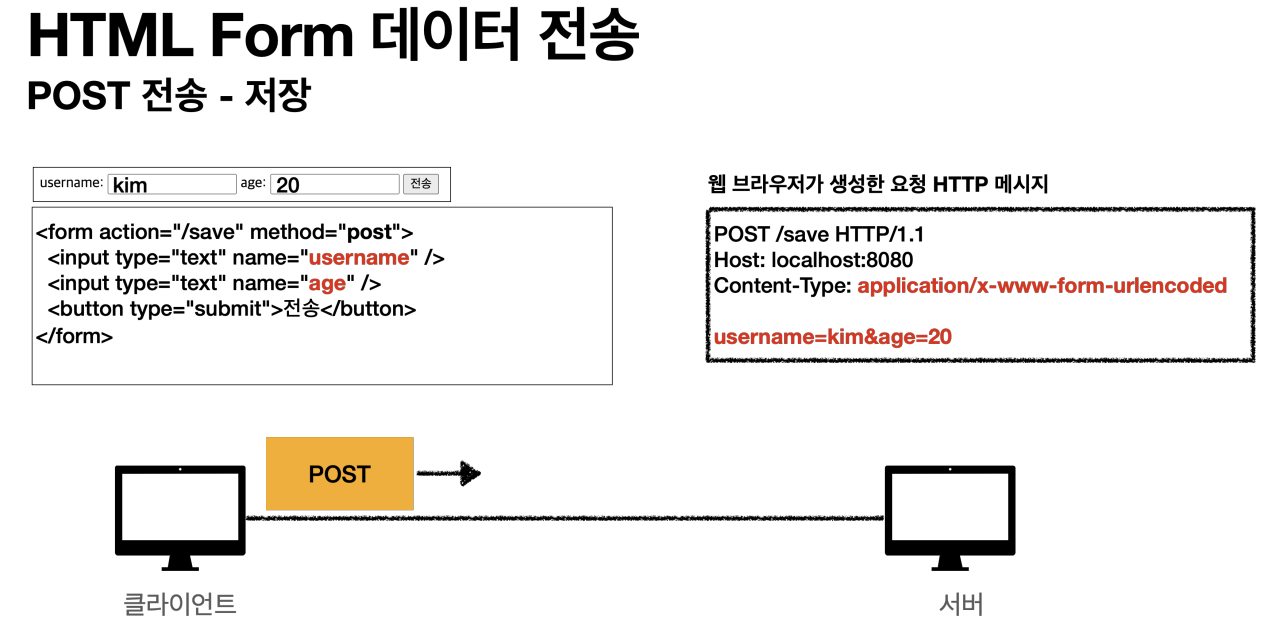
HTML 폼 전송 방식
- application/x-www-form-urlencoded
- multipart/form-data
application/x-www-form-urlencoded 방식
multipart/form-data 방식
파일을 업로드 하려면 파일은 문자가 아니라 바이너리 데이터를 전송해야 한다. 또한 보통 업로더 이름, 파일 이름 등 문자도 함께 전송해야 한다. 이를 위해 HTTP는 multipart/form-data 라는 전송 방식을 제공한다.
multipart/form-data 방식은 다른 종류의 여러 파일과 폼의 내용 함께 전송할 수 있다. (그래서 이름이 multipart 이다.)

폼의 입력 결과로 생성된 HTTP 메시지를 보면 각각의 전송 항목이 Part로 구분이 되어있다.
Content-Disposition 이라는 항목별 헤더가 추가되어 있고 여기에 부가 정보가 있다.
폼의 일반 데이터는 각 항목별로 문자가 전송되고, 파일의 경우 파일 이름과 Content-Type이 추가되고 바이너리 데이터가 전송된다. multipart/form-data 는 이렇게 각각의 항목을 구분해 한번에 전송하는 것이다. (영상은 Content-Type이 달라짐)
파일 업로드 구현
application.properties 멀티 파트 사용 옵션
업로드 사이즈 제한
큰 파일을 무제한 업로드하게 둘 수는 없으므로 업로드 사이즈를 제한할 수 있다.
사이즈를 넘으면 예외( SizeLimitExceededException )가 발생한다
spring.servlet.multipart.max-file-size=1MB
spring.servlet.multipart.max-request-size=10MB
spring.servlet.multipart.enabled 끄기
아래 옵션을 끄면 서블릿 컨테이너는 멀티파트와 관련된 처리를 하지 않는다.
spring.servlet.multipart.enabled=false
그래서 해당 옵션을 끄고 결과 로그를 보면 request.getParameter("itemName") , request.getParts() 의 결과가 비어있고,
request 객체도 org.apache.catalina.connector.RequestFacade이다. (기본)
옵션을 켜면 (default true) request 객체가 StandardMultipartHttpServletRequest 로 변한 것을 확인할 수 있다.
MultipartHttpServletRequest는 HttpServletRequest 의 자식 인터페이스이고, 멀티파트와 관련된 추가 기능을 제공한다.
(디스패처 서블릿이 멀티파트 요청일 경우 request 객체를 바꾼다)
서블릿이 제공하는 방식
서블릿이 제공하는 Part 에 대해 알아보고 실제 파일도 서버에 업로드 해보자.
멀티파트 형식은 전송 데이터를 하나하나 각각 부분( Part )으로 나누어 전송한다. parts 에는 이렇게 나누어진 데이터가 각각 담긴다. 서블릿이 제공하는 Part 는 멀티 파트 형식을 편리하게 읽을 수 있는 다양한 메서드를 제공한다
@PostMapping("/upload")
public String saveFileV2(HttpServletRequest request) throws ServletException, IOException {
    log.info("request={}", request);

    String itemName = request.getParameter("itemName");
    log.info("itemName={}", itemName);

    Collection<Part> parts = request.getParts();
    log.info("parts={}", parts);

    for (Part part : parts) {
        log.info("========= PART ========");
        log.info("part.getName()={}", part.getName());

        //파트도 헤더와 바디로 구분된다.
        Collection<String> headerNames = part.getHeaderNames();
        for (String headerName : headerNames)
            log.info("header {}: {}", headerName, part.getHeader(headerName));

        //편의 메서드
        //content-disposition: form-data; name="file"; filename="스크린샷.png"
        log.info("submittedFilename={}", part.getSubmittedFileName());
        log.info("part body size={}", part.getSize());

        //데이터 읽기
        InputStream inputStream = part.getInputStream();
        String body = StreamUtils.copyToString(inputStream, StandardCharsets.UTF_8); //바이너리를 문자로 읽을때는 charset 지정해야 한다.
        log.info("body={}", body);


        //파일일 경우 저장하기
        if (StringUtils.hasText(part.getSubmittedFileName())) {
            String fullPath = fileDir + part.getSubmittedFileName();
            log.info("파일 저장 fullPath={}", fullPath);
            part.write(fullPath);
        }
    }

    return "upload-form";
}
서블릿이 제공하는 Part 는 편하기는 하지만, HttpServletRequest 를 사용해야 하고, 추가로 파일 부분만 구분하려면 여러가지 코드를 넣어야 한다.
이번에는 스프링이 이 부분을 얼마나 편리하게 제공하는지 확인해보자.
스프링이 제공하는 방식
스프링은 MultipartFile 이라는 인터페이스로 멀티 파트 파일을 매우 편리하게 지원한다.
request에서 파트 별로 데이터를 뽑아내고, inputstream으로 데이터를 받아서 문자로 바꾸고 하는 과정이 필요없다!
@RequestParam이나 @ModelAttribute에서 일반 form 데이터 별, MultipartFile 별로 바로 받을 수 있다.
@PostMapping("/upload")
public String saveFile(@RequestParam String itemName, @RequestParam MultipartFile file, HttpServletRequest request) throws IOException {
    log.info("request={}", request);
    log.info("itemName={}", itemName);
    log.info("multipartFile={}", file);

    //파일 저장
    if (!file.isEmpty()) {
        String fullPath = fileDir + file.getOriginalFilename();
        file.transferTo(new File(fullPath));
    }

    return "upload-form";
}
파일 업로드, 다운로드 구현 시 고려할 점
# 업로드 시
1. 업로드한 파일명, 서버에 저장된 파일명 구분하기
고객이 업로드한 파일명으로 서버 내부에 파일을 저장하면 안된다. 왜냐하면 서로 다른 고객이 같은 파일 이름을 업로드 하는 경우 기존 파일 이름과 충돌이 날 수 있다. 서버에서는 저장할 파일명이 겹치지 않도록 내부에서 관리하는 별도의 파일명이 필요하다.
public class UploadFile {
    private String uploadFileName;
    private String storeFileName; //파일명이 중복될 수 있으므로 UUID를 붙인다.
}
2. 다중 파일 업로드
다중 파일 업로드를 하려면 multiple="multiple" 옵션을 주면 된다.
<li>이미지 파일들<input type="file" multiple="multiple" name="imageFiles"></li>
ItemForm 의 다음 코드에서 여러 이미지 파일을 받을 수 있다. MultipartFile 타입으로 받으면 된다.
public class ItemForm {
    private Long itemId;
    private String itemName;
    private MultipartFile attachedFile;
    private List<MultipartFile> imageFiles;
}
# 다운로드
첨부 파일은 링크로 걸어두고, 이미지는 <img> 태그를 반복해서 출력한다.
1. 브라우저에서 이미지 파일을 보여줄 때 이미지 소스
<img th:each="imageFile : ${item.imageFiles}" th:src="|/images/${imageFile.getStoreFileName()}|" width="300" height="300"/>
UrlResource 로 이미지 파일을 읽어서 @ResponseBody 로 이미지 바이너리를 반환한다.
@ResponseBody
@GetMapping("/images/{filename}")
public Resource downloadImage(@PathVariable String filename) throws MalformedURLException {
    return new UrlResource("file:" + fileStore.getFullPath(filename));
}
2. 첨부 파일 다운로드할 경우에는 Content-Disposition 헤더에 attachment; filename="업로드 파일명" 값을 주면 된다.
3. 고객이 업로드한 파일 이름으로 다운로드. 파일명 URI 인코딩 필요.
@GetMapping("/attach/{itemId}")
public ResponseEntity<Resource> downloadAttachedFile(@PathVariable Long itemId) throws MalformedURLException {
    Item item = itemRepository.findById(itemId);
    String storeFileName = item.getAttachedFile().getStoreFileName();
    String uploadFileName = item.getAttachedFile().getUploadFileName();

    UrlResource urlResource = new UrlResource("file:" + fileStore.getFullPath(storeFileName));

    String encodedUploadFileName = UriUtils.encode(uploadFileName, StandardCharsets.UTF_8);
    String contentDisposition = "attachment; filename=\"" + encodedUploadFileName + "\"";

    return ResponseEntity.ok()
            .header(HttpHeaders.CONTENT_DISPOSITION, contentDisposition) //브라우저에서 다운로드할 수 있도록
            .body(urlResource);
}
참고 자료 & 이미지 출처
스프링 MVC 2편 - 백엔드 웹 개발 활용 기술 (김영한 님)
'Spring > Spring MVC - 웹 개발 활용 기술' 카테고리의 다른 글
| 스프링 타입 컨버터 (0) | 2025.01.24 |
|---|---|
| 요약 - 로그인 처리 (0) | 2024.08.25 |
| 요약 - 검증과 예외 처리 (0) | 2024.08.24 |
| API 예외 처리 (0) | 2024.08.11 |
| 예외 처리와 오류 페이지 (0) | 2024.08.10 |


