
Notice
Recent Posts
Recent Comments
Link
| 일 | 월 | 화 | 수 | 목 | 금 | 토 |
|---|---|---|---|---|---|---|
| 1 | 2 | 3 | 4 | 5 | 6 | |
| 7 | 8 | 9 | 10 | 11 | 12 | 13 |
| 14 | 15 | 16 | 17 | 18 | 19 | 20 |
| 21 | 22 | 23 | 24 | 25 | 26 | 27 |
| 28 | 29 | 30 |
Tags
- @Transactional
- 스프링 부트
- dockerhub
- Web
- JdbcTemplate
- kafka
- docker
- @ComponentScan
- 컨테이너
- redis
- JPA
- Dead Letter Queue
- 쿠버네티스
- Spring Container
- DLQ
- DI
- mybatis
- Routing Key
- docker compose
- JWT
- 서블릿 컨테이너
- securitycontextholderfilter
- MSA
- 페이징
- Spring
- JPQL
- 지연 로딩
- CORS
- AWS
- Spring Data JPA
Archives
- Today
- Total
look-forest
Exchange의 이해와 기본 비동기 메시지 전송 본문
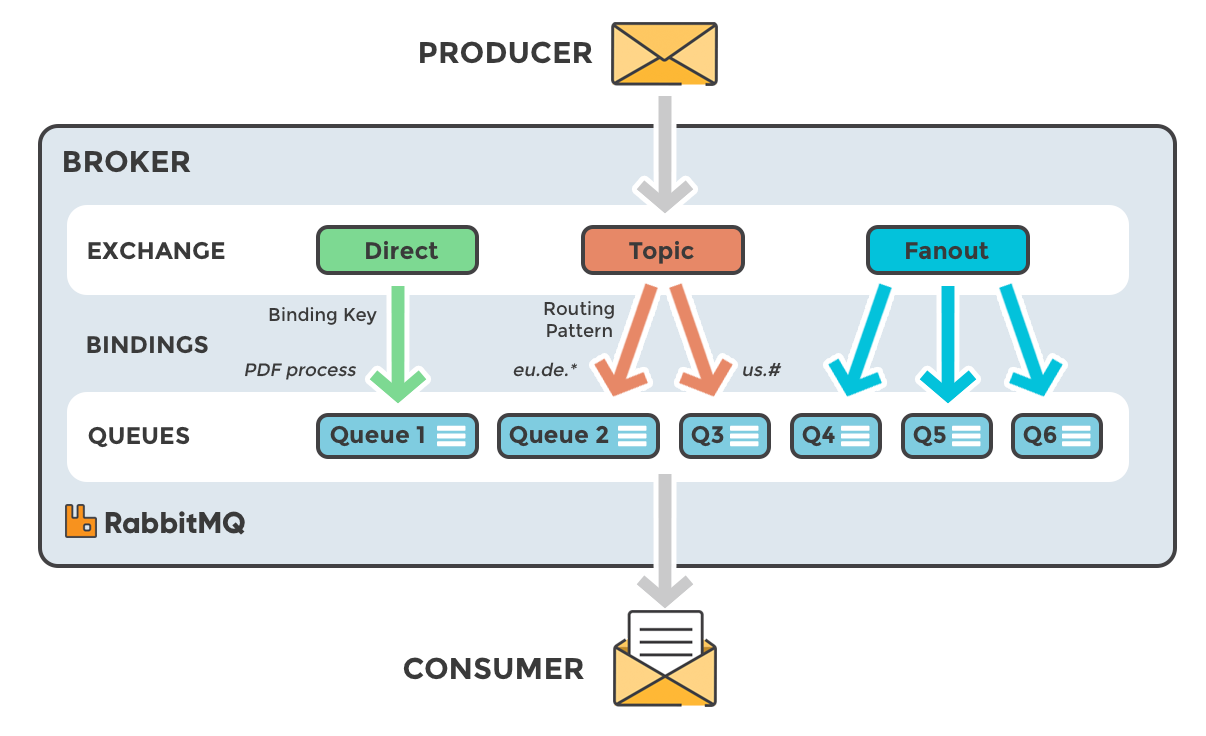
Exchange 유형에 따른 처리 흐름
1. Direct Exchange
메시지를 발행할 때 사용하는 라우팅 키와 동일한 키로 익스체인지에 바인딩 된 모든 큐에 메세지를 전달.
해당 라우팅 키와 일치하는 큐에만 메시지가 전달되는 방식이기 때문에 Direct Exchange 라고 한다.
매핑이 정확하게 되는 한개의 키만 있으니까 1:1로 가능할거 같은데, 하나의 라우팅 키에 대해 여러 큐가 바인딩될 수 있기 때문에 1:N 매칭이 가능하다.
활용
- 메시지가 명확하게 특정 큐로 전달되어야 할 때
- 큐마다 고유한 라우팅 규칙을 적용하여 메시지를 분류해야 할 때
- 예시 업무: 주문 상태 처리, 결제 처리, 사용자 알림 시스템 등
- 주문 상태별로 라우팅 키를 정의하고, 각 상태에 해당하는 큐가 메시지를 받는다
2. Topic Exchange
라우팅 키를 패턴 기반으로 정의하여 메시지를 여러 큐에 유연하게 전달.
라우팅 키에 와일드카드(*, #) 매칭을 사용하여 더 복잡한 라우팅이 가능
와일드카드
- * : 1개 단어 대체. log.info, log.warn, log.error -> log.*
- # : 0개 이상의 단어를 대체: app.order.success, app.payment.success -> #.success
활용
- 동적이고 유연한 라우팅이 필요할 때(로그 수집 시스템, 이벤트 기반 모니터링 등)
3. Fanout Exchange
브로드캐스트 방식으로 메시지를 모든 바인딩된 큐에 전달.
한 번의 메시지 발행으로 모든 큐가 동일한 메시지를 받는다.
활용
- 이벤트가 발생하면 모든 서비스가 동일한 메시지를 받는 서비스에서 유용(시스템 점검 공지 등)
4. Headers Exchange
메시지의 속성(헤더)에 기반한 복잡한 라우팅이 필요할 때
활용
- 다국어 서비스, 고객의 등급별 혜택 알림
- 메시지 헤더에 language: "ko", language: "en" 등의 값을 설정하여 헤더 기반 라우팅을 수행
"ko"로 설정된 메시지는 한국어 이메일 서비스에서 처리, "en"으로 설정된 메시지는 영어 이메일 서비스에서 처리
메시지 전송 단계별 프로세스
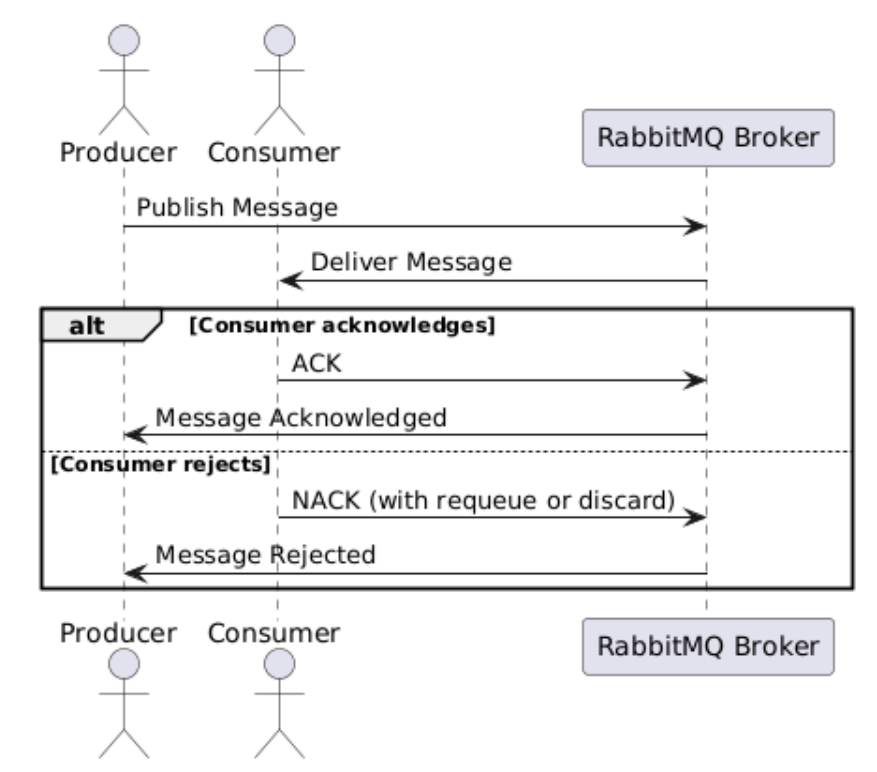
- 메시지 송신 (Producer -> Broker)
- Producer가 RabbitMQ Broker로 메시지를 송신
- 이때 메시지는 큐에 저장되며, 익스체인지와 바인딩 설정에 따라 적절한 큐로 라우팅
- 메시지 전달 (Broker -> Consumer)
- Broker는 큐에 있는 메시지를 Consumer에게 전달
- Consumer는 큐에서 메시지를 가져가거나(Polling, 일정 주기로 계속 물어보는 Pull의 한 형태), 메시지를 푸시(Push) 받는 방식으로 수신
- 메시지 확인(ACK) 또는 거절(NACK)
- ACK: Consumer가 메시지를 성공적으로 처리한 후 Broker에 ACK(Acknowledgment) 전송.
- 이 경우 Broker는 해당 메시지를 큐에서 제거하고 Producer에게 Message Acknowledged 응답
- NACK: Consumer가 메시지 처리에 실패하거나 메시지를 거절할 경우 NACK(Negative Acknowledgment) 전송.
- Consumer가 메시지를 NACK하면 Broker는 Producer에게 Message Rejected 응답
- NACK에는 메시지를 다시 큐로 보내야 할지(requeue) 또는 폐기해야 할지(discard) 설정 가능
- ACK: Consumer가 메시지를 성공적으로 처리한 후 Broker에 ACK(Acknowledgment) 전송.
- Producer에 응답 (Message Acknowledged / Message Rejected)
- Producer가 Publisher Confirms를 활성화한 경우, Broker는 ACK 또는 NACK 결과를 Producer에게 전송
- ACK를 받은 경우 메시지가 성공적으로 소비된 것으로 간주되며,
NACK를 받은 경우 Producer는 메시지 실패를 기록하거나 재전송
- Producer가 Publisher Confirms를 활성화한 경우, Broker는 ACK 또는 NACK 결과를 Producer에게 전송
단순 메시지 전송 (Producer to Consume)
RabbitMQ는 아무 설정을 안 해도 동작하도록 이미 내부에 기본 Exchange(Default Exchange) + 자동 바인딩 구조가 존재한다.
rabbitTemplate.convertAndSend("myQueue", message);위와 같이 메시지를 보냈다면, 실제 내부적으로는 아래와 같이 동작한다.
Producer
↓
Default Direct Exchange ("")
↓ (routingKey = myQueue)
Queue (myQueue)
↓
Consumer
구현
application.yml 작성
spring:
  rabbitmq:
    host: localhost
    port: 5672 # 기본 통신 포트, 15672는 주로 관리 및 모니터링(admin) 용
    username: guestuser
    password: guestuser
  application:
    name: HelloMessageQueue
server:
  port: 8080
설정 Bean 생성
implementation 'org.springframework.boot:spring-boot-starter-amqp'Kafka 처럼 RabbitMQ를 사용하기 위해 위 의존성을 추가하면 자동으로 RabbitTemplate 등을 제공하지만,
AMQP 구조를 명확히 보기 위해 직접 Bean을 등록해보자.
- Queue
- Queue 인스턴스를 생성하고, 애플리케이션이 사용할 큐를 정의, 메시지를 전달하고 처리하는 기본 큐 세팅
- Spring이 시작될 때 RabbitMQ 서버에 “이 큐를 생성하라”라고 선언하기 위해 빈으로 만든다.
Queue Bean 발견
↓
RabbitAdmin이 감지
↓
애플리케이션 시작 시
↓
RabbitMQ 서버에 queue.declare 실행 - Durable 속성을 True로 설정하면 RabbitMQ 서버가 예기치 않게 종료되거나 재시작될 경우에도 해당 Queue의 정의나 Queue에 있던 메시지가 손실되지 않고 보존. 영구적인 메시지 처리가 필요한 경우 중요.
- .RabbitTemplate
- RabbitMQ와 통신하기 위한 템플릿 인스턴스 생성, 메시지 송수신용
- JdbcTemplate과 비슷하게, RabbitMQ와 상호작용하기 위한 간단한 API 제공. 주로 메시지 전송 담당.
메시지를 전송하는 Sender가 rabbitTemplate.convertAndSend() 메서드를 사용해 큐에 메시지를 넣는데 사용.
(convert는 메시지 변환(직렬화)을 해준다는 의미) - ConnectionFactory는 RabbitMQ와의 연결을 관리하는 객체.
rabbitTemplate에 주입하여 메시지를 전송할 때 사용할 연결을 제공
- SimpleMessageListenerContainer
- RabbitMQ 메시지를 비동기적으로 수신하기 위한 리스너
- 이 컨테이너가 특정 큐를 지속적으로 모니터링하고 메시지를 수신하면 지정된 리스너(MessageListenerAdapter)를 통해 처리
- ConnectionFactory는 RabbitMQ와 연결을 유지하며, 수신하는 메시지를 이 연결을 통해 가져옴
- setQueueNames(QUEUE_NAME) 메서드는 특정 큐 이름을 설정. 이 컨테이너는 코드에서 설정한 큐에서 수신되는 메시지를 모니터링
- setMessageListener(listenerAdapter)는 listenerAdapter를 설정하여, 메시지가 수신될 때 호출할 리스너를 지정
- MessageListenerAdapter
- 수신한 메시지를 특정 클래스의 특정 메서드로 전달하는 어댑터, 인자로 전달된 메서드를 자동으로 호출
- receiver 객체는 메시지를 처리하는 역할을 하는 빈이며, receiveMessage 메서드를 호출
@Configuration
public class RabbitMQConfig {
	// 큐 네임 설정
	public static final String QUEUE_NAME = "hello-queue";

	//Spring이 시작될 때 RabbitMQ 서버에 “이 큐를 생성하라”라고 선언하기 위해
	@Bean
	public Queue queue() {
		//QUEUE_NAME은 메시지가 쌓이고 처리될 큐의 이름을 정의
		return new Queue(QUEUE_NAME, false); //영속화 여부
	}


	//RabbitTemplate: 래빗엠큐로 메시지를 보내는 데 사용되는 템플릿 클래스
	@Bean
	public RabbitTemplate rabbitTemplate(ConnectionFactory connectionFactory) {
		return new RabbitTemplate(connectionFactory); //ConnectionFactory: 래빗엠큐의 연결 관리
	}

	//SimpleMessageListenerContainer: 래빗엠큐에서 메시지를 수신하고 처리하는 리스너 컨테이너
	@Bean
	public SimpleMessageListenerContainer container(ConnectionFactory connectionFactory,
		MessageListenerAdapter listenerAdapter) {
		SimpleMessageListenerContainer container = new SimpleMessageListenerContainer();
		container.setConnectionFactory(connectionFactory);
		container.setQueueNames(QUEUE_NAME);
		container.setMessageListener(listenerAdapter);
		return container;
	}

	//MessageListenerAdapter: 메시지를 처리할 리스너 어댑터
	@Bean
	public MessageListenerAdapter listenerAdapter(Receiver receiver) {
		return new MessageListenerAdapter(receiver, "receiveMessage");
	}
}
메시지 Sender와 Receiver 구현
//consumer 역할
@Component
public class Receiver {
	public void receiveMessage(String message) {
		System.out.println("[#] Received: " + message);
	}
}

@Component
@RequiredArgsConstructor
public class Sender {

	private final RabbitTemplate rabbitTemplate;

	public void send(String message) {
		rabbitTemplate.convertAndSend(RabbitMQConfig.QUEUE_NAME, message);
		System.out.println("[#] Sent: " + message);
	}
}
참고 자료 & 이미지 출처
RabbitMQ를 이용한 비동기 아키텍처 한방에 해결하기
'Middleware > RabbitMQ (메시지 브로커)' 카테고리의 다른 글
| Dead Letter Queue 재처리와 Retry (0) | 2026.03.13 |
|---|---|
| Routing Model을 이용한 Log 수집 (0) | 2026.02.22 |
| Pub/Sub 모델을 이용한 실시간 알림과 뉴스 구독 (WebSocket, STOMP 활용) (0) | 2026.02.22 |
| 경쟁 소비자 패턴(Work Queue 모델)과 큐의 메시지 상태 (0) | 2026.02.17 |
| RabbitMQ 개요와 주요 용어 (0) | 2026.02.17 |