
| 일 | 월 | 화 | 수 | 목 | 금 | 토 |
|---|---|---|---|---|---|---|
| 1 | 2 | 3 | 4 | 5 | 6 | |
| 7 | 8 | 9 | 10 | 11 | 12 | 13 |
| 14 | 15 | 16 | 17 | 18 | 19 | 20 |
| 21 | 22 | 23 | 24 | 25 | 26 | 27 |
| 28 | 29 | 30 |
- 페이징
- Dead Letter Queue
- Spring Container
- DI
- 쿠버네티스
- AWS
- CORS
- DLQ
- JPA
- MSA
- 스프링 부트
- Routing Key
- @ComponentScan
- Spring Data JPA
- JWT
- 서블릿 컨테이너
- 컨테이너
- JdbcTemplate
- JPQL
- kafka
- 지연 로딩
- docker
- @Transactional
- docker compose
- securitycontextholderfilter
- dockerhub
- mybatis
- redis
- Web
- Spring
- Today
- Total
look-forest
사용, 테스트 방법 본문
먼저 스프링 시큐리티 기본 구현 방법을 알아보자.
스프링 시큐리티 사용법
스프링 시큐리티 연동
스프링 시큐리티 의존성을 추가하고 나면
- 모든 요청은 인증을 필요로 하고,
- 기본 로그인 페이지가 나타나며,
- 기본 유저가 생성된다. (by UserDetailsServiceAutoConfiguration, SecurityProperties)
스프링 시큐리티 설정
DefaultSecurityFilterChain이 아닌 커스텀 SecurityFilterChain를 등록하려면 아래와 같이
SecurityFilterChain 인터페이스를 반환하면 된다.
@Configuration
@EnableWebSecurity
public class SecurityConfig {

    @Bean
    public SecurityFilterChain securityFilterChain(HttpSecurity http) throws Exception {
        http.authorizeHttpRequests(authorizeRequests -> authorizeRequests.
                requestMatchers("/", "/info", "/account/**").permitAll()
                .requestMatchers("/admin").hasRole("ADMIN")
                .anyRequest().authenticated()
        );
        http.formLogin(Customizer.withDefaults());
        http.csrf((auth) -> auth.disable());
        return http.build();
    }
}
인메모리 사용자 추가
UserDetailsService 인터페이스 구현체가 필요.
반환 타입으로 UserDetails 인터페이스의 구현체인 User 정보를 반환 (security 제공 객체)
@Bean
public UserDetailsService userDetailsService() {
    UserDetails adminUser = User.builder()
            .username("admin")
            .password(passwordEncoder().encode("admin"))
            .roles("ADMIN")
            .build();

    return new InMemoryUserDetailsManager(adminUser);
}
DB에 회원 정보를 저장하는 경우
DB에 회원 정보를 저장하고 조회하는 경우, UserDetailsService 를 상속받아 User 정보를 load하는 메소드를 구현. UserDetailsService 타입을 Bean으로만 등록되면 Spring Security가 알아서 갖다 쓴다!
@Service
public class AccountService implements UserDetailsService {

    private final AccountRepository accountRepository;
    private final PasswordEncoder passwordEncoder;

    @Override
    public UserDetails loadUserByUsername(String username) throws UsernameNotFoundException {

        Account account = accountRepository.findByUsername(username)
        					.orElseThrow(() -> new UsernameNotFoundException(username));

        return User.builder()
                .username(account.getUsername())
                .password(account.getPassword())
                .roles(account.getRole())
                .build()
                ;
    }
}
PasswordEncoder
spring security에서 비밀번호는 단방향 암호화 알고리즘으로 인코딩해서 저장해야 한다.
스프링 시큐리티가 제공하는 PasswordEndoer는 특정한 포맷으로 동작하는데, {id}encodedPassword 구조이다.
{id}에 해당하는 다양한 해싱 전략의 패스워드를 지원할 수 있다는 장점이 있다.
기본 추천 전략인 bcrypt 방식을 다음과 같이 등록하면 아래와 같이 등록된다.
@Bean
public PasswordEncoder passwordEncoder() {
    return PasswordEncoderFactories.createDelegatingPasswordEncoder();
    //{bcrypt}$2a$10$Z0mUanbB26XYAAnPOlj3W.7THw8wywvzYIID2gXS5UP4PDf4inAwa
}
Role Hierarchy (계층 권한) 설정
@Bean
public RoleHierarchy roleHierarchy() {
    return RoleHierarchyImpl.fromHierarchy("ROLE_ADMIN > ROLE_USER");
}
멀티 SecurityFilterChain - 경로 설정 필수! (feat. securityMatchers)
FilterChainProxy는 등록된 N개의 SecurityFilterChain 중 하나를 선택해서 요청을 전달한다.
선택 기준은 아래와 같다.
1) 등록 인덱스 순
2) 필터 체인에 대한 securityMatchers 가 일치하는지 확인
- N개의 SecurityFilterChain을 등록 한 뒤 등록되는 순서를 직접 선정하고 싶은 경우
@Order() 어노테이션에 값을 명시할 수 있다. - SecurityFilterChain에 대한 경로 매핑은 securityMatchers 를 사용하면 된다.
이게 없으면 전부 /**로 등록되어 첫번째 순번인 SecurityFilterChain 만 선택된다.
@Configuration
@EnableWebSecurity
public class SecurityConfig {

    @Bean
    public SecurityFilterChain publicSecurityFilterChain(HttpSecurity http) throws Exception {
        http
            .securityMatcher("/public/**")  // /public/** 경로에 대해
            .authorizeHttpRequests(authorize -> authorize
                .anyRequest().permitAll()  // 모든 요청 허용
            );
        return http.build();
    }

    @Bean
    public SecurityFilterChain privateSecurityFilterChain(HttpSecurity http) throws Exception {
        http
            .securityMatcher("/private/**")  // /private/** 경로에 대해
            .authorizeHttpRequests(authorize -> authorize
                .anyRequest().authenticated()  // 인증된 요청만 허용
            );
        return http.build();
    }

    // 추가 SecurityFilterChain 정의 가능
}
필터 적용 예외
SecurityFilterChain을 거치게 된다면 내부적으로 여러 가지 필터를 거치게 되어 서버의 자원을 사용하고 상주 시간이 길어지므로, 인증/인가가 필요하지 않을 경우 필터 적용 예외 처리를 할 수 있다. (보통 이미지, CSS 등 정적 자원)
아래와 같이 코드 추가시 하나의 SecurityFilterChain이 0 번 인덱스로 설정되며 해당 필터 체인 내부에는 필터가 없는 상태로 생성된다.
@Bean
public WebSecurityCustomizer webSecurityCustomizer() {
//스프링 부트가 제공해주는 스태틱 리소스의 기본 위치에는 스프링 시큐리티 적용x
return web -> web.ignoring().requestMatchers(PathRequest.toStaticResources().atCommonLocations());
    //return web ->  web.ignoring().requestMatchers("/css/**", "/js/**", "/images/**", "/fonts/**");
}
세션 설정 (소멸, 중복 로그인, 고정보호)
http.sessionManagement(auth -> auth
        .maximumSessions(1) //다중 로그인 허용 개수
        .maxSessionsPreventsLogin(true) //다중 로그인 개수 초과 시 처리 방법 (true: 추가 로그인 허용 안함, 기본 false)
);

http.sessionManagement(auth -> auth
        .sessionFixation().changeSessionId() //세션 고정 보호 (전략: 세션 Id 변경)
);

http.sessionManagement(auth -> auth
        .sessionCreationPolicy(SessionCreationPolicy.STATELESS) //세션 사용 안함
);
예외 처리 화면/로직 커스텀
- 로그인을 안한 경우 AuthenticationEntryPoint 정의
- 권한이 없을 경우AccessDeniedHandler 정의
http
        .exceptionHandling(exception -> exception
                .authenticationEntryPoint((request, response, accessDeniedException) -> {
                    CustomResponseUtil.fail(response, "로그인을 진행해주세요", HttpStatus.UNAUTHORIZED);
                })
                .accessDeniedHandler((request, response, accessDeniedException) -> {
                    CustomResponseUtil.fail(response, "관리자 권한이 없습니다", HttpStatus.FORBIDDEN);
                })
        );
현재 사용자 조회하기
@AuthenticationPrincipal 애노테이션을 사용하면 인증을 한 경우에 Principal, 안한 경우 null을 가져온다.
UserDetails를 상속한 커스텀 클래스를 어댑터로 활용하여 사용자 클래스를 바로 꺼내올 수 있다.
추가로 커스텀 애노테이션을 만들면 더 편하게 사용할 수 있다.
※ 사용자 정보 객체를 연관 엔티티에 persist할 필요가 있을 경우, DB에서 다시 조회해온 엔티티여야 한다.
@GetMapping
public ResponseEntity<?> queryEvents(Pageable pageable, PagedResourcesAssembler<Event> assembler,
                                     //@AuthenticationPrincipal UserDetails currentUser
                                     //@AuthenticationPrincipal CustomUserDetails currentUser
                                     //@AuthenticationPrincipal(expression = "account") Account currentUser
                                     @CurrentUser Account currentUser) {
    Page<Event> page = eventRepository.findAll(pageable);
    //Page 를 PageResource 로 변환해서 받기 -> 링크 생성
    PagedModel<EntityModel<Event>> pagedResources = assembler.toModel(page, EventResource::new);
    pagedResources.add(Link.of("/docs/index.html#resources-events-list").withRel("profile"));
    if (currentUser != null) {
        pagedResources.add(linkTo(EventController.class).withRel("create-event"));
    }
    return ResponseEntity.ok().body(pagedResources);
}
public class CustomUserDetails implements UserDetails {

    private final Account account;

    //사용자 정보를 파라미터로 전달할 때 사용 @AuthenticatedPrincipal
    public Account getAccount() {
        return account;
    }

    @Override
    public String getUsername() {
        return account.getEmail();
    }
@Target(ElementType.PARAMETER)
@Retention(RetentionPolicy.RUNTIME)
@AuthenticationPrincipal(expression = "#this == 'anonymousUser'? null : account") //익명사용자는 principal 이 String
public @interface CurrentUser {
}
Remember Me (로그인 유지하기 기능)
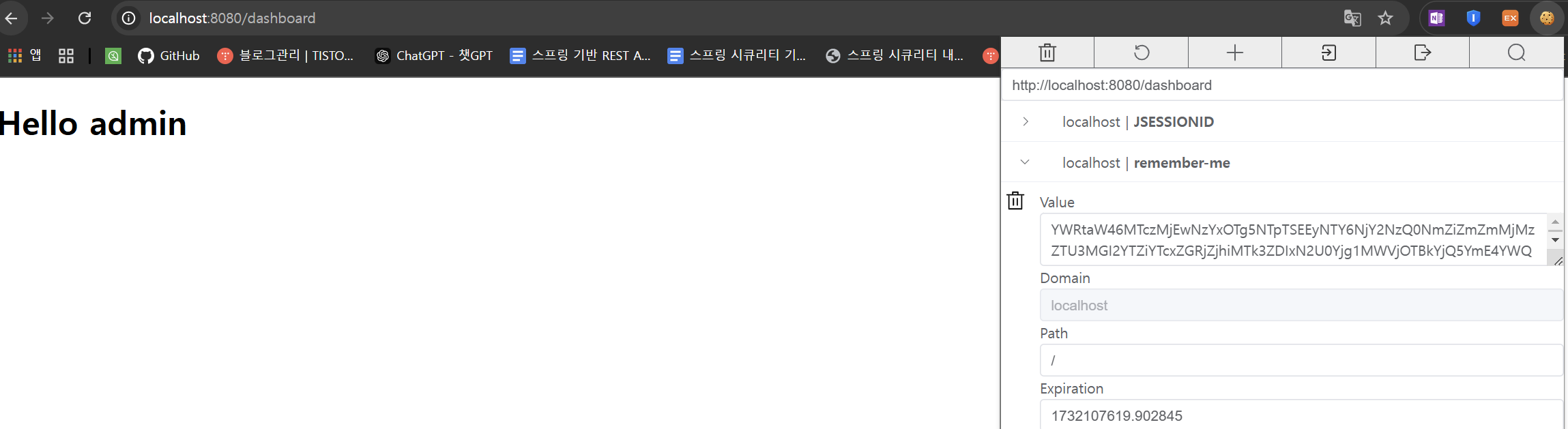
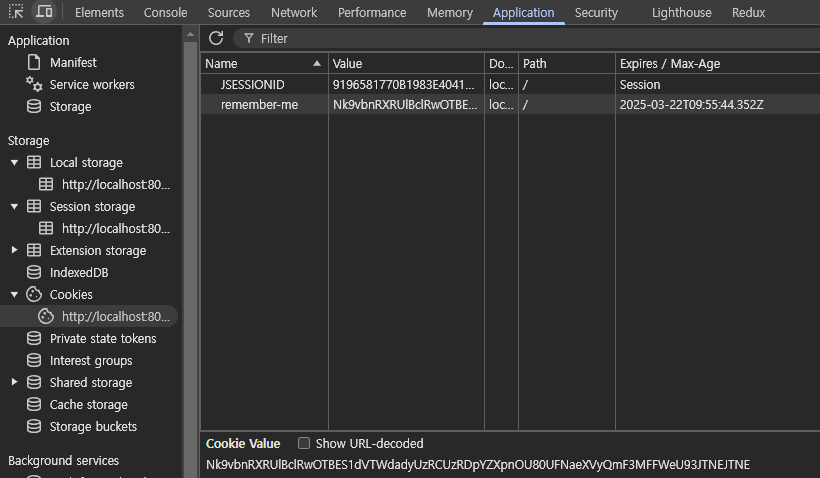
세션이 만료되더라도 로그인을 유지하고 싶을 때 사용하는 방법.
쿠키에 인증 정보를 남겨두고 세션이 만료됐을 때는 쿠키에 남아있는 정보로 인증한다.
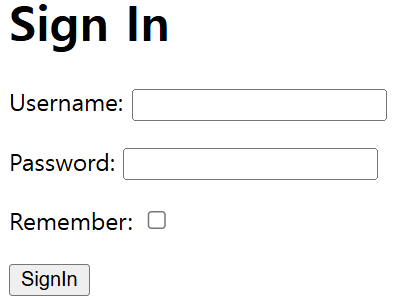
J세션을 지워도 remember-me 토큰을 이용해서 로그인이 유지가 된다.
설정 방법
//로그인 유지하기 (기본 값 2주)
http.rememberMe(httpSecurityRememberMeConfigurer ->
        httpSecurityRememberMeConfigurer.rememberMeParameter("remember-me"));
문제점
해시 기반의 쿠키(Username, Password, 만료기간, key) 사용 시
http.rememberMe().key("애플리케이션 마다 다른 키 값")-> 쿠키가 탈취되면 계정이 탈취된 것과 마찬가지..
좀 더 안전한 방법
스프링 시큐리티는 좀 더 안전한 방법도 제공한다.
쿠키 안에 Username, 토큰(랜덤, 매 로그인마다 바뀜), 시리즈(랜덤, 고정 값)을 둔다.
쿠키를 탈취 당한 경우, 해커나 희생자는 유효하지 않은 토큰과 유효한 Username, 시리즈로 접속 시도하게 된다.
이런 경우 쿠키를 사용하는 사람이 1명 이상이라는 뜻이 되므로, 모든 토큰을 삭제해버린다.
http
        .rememberMe(rememberMe -> rememberMe
                .userDetailsService(accountService)
                .tokenRepository(tokenRepository())); //토큰 정보를 DB에 저장하고 읽어오는 구현체


@Bean
public PersistentTokenRepository tokenRepository() {
    JdbcTokenRepositoryImpl jdbcTokenRepository = new JdbcTokenRepositoryImpl();
    jdbcTokenRepository.setDataSource(dataSource);
    return jdbcTokenRepository;
}

// 실제 저장할 테이블도 있어야 하므로, Entity도 등록해야 한다.
스프링 시큐리티 테스트
폼 로그인/로그아웃 테스트
- perform(formLogin().user("admin").password("pass"))
- perform(logout())
- 응답 유형 확인 : authenticated(), unauthenticated()
@Test
@Transactional //롤백
@DisplayName("form 로그인 테스트")
void login() throws Exception {
    // Given
    String username = "jaeryang";
    String password = "123";
    Account user = createUser(username, password);

    // When & Then
    mockMvc.perform(formLogin().user(username).password(password))
            .andExpect(authenticated());
}
권한 테스트
RequestPostProcessor를 사용해서 테스트 하는 방법
- with(user(“user”).password(“123”).roles(“USER”, “ADMIN”))
- with(anonymous())
애노테이션을 사용하는 방법
- @WithMockUser(username = "jaeryang", roles=”ADMIN”)
- 간단한 가짜 사용자(Mock User)를 생성하여 Security Context에 추가
- 커스텀 애노테이션을 만들어 재사용 가능.
@Retention(RetentionPolicy.RUNTIME)
@WithMockUser(username = "jaeryang", roles = "ADMIN")
public @interface WithAdmin {
}
@Test
@DisplayName("admin 페이지 USER 권한으로 접근 시 권한 없음 오류")
@WithUser
//@WithMockUser(username = "jaeryang", roles = "USER")
void admin_user() throws Exception {
mockMvc.perform(get("/admin"))
.andDo(print())
.andExpect(status().isForbidden());
}
실제 DB에 저장되어 있는 정보에 대응하는 인증된 Authentication이 필요하다면 @WithUserDetails를 사용하자.
실제 사용자 정보를 DB에서 읽어와 업데이트하는 테스트 예시.
@BeforeEach
void beforeEach() {
    SignUpForm signUpForm = new SignUpForm();
    signUpForm.setNickname("cjl0701");
    signUpForm.setEmail("cjl0701@email.com");
    signUpForm.setPassword("12345678");
    accountService.processNewAccount(signUpForm);
}

@AfterEach
void afterEach() {
    accountRepository.deleteAll();
}

@WithUserDetails(value = "cjl0701", setupBefore = TestExecutionEvent.TEST_EXECUTION)
@DisplayName("프로필 수정하기 - 입력값 정상")
@Test
void updateProfile() throws Exception {
    String bio = "짧은 소개를 수정하는 경우";
    mockMvc.perform(post(SettingsController.SETTINGS_PROFILE_URL)
                    .param("bio", bio)
                    .with(csrf()))
            .andExpect(status().is3xxRedirection())
            .andExpect(redirectedUrl(SettingsController.SETTINGS_PROFILE_URL))
            .andExpect(flash().attributeExists("message"));

    Account account = accountRepository.findByNickname("cjl0701");
    assertEquals(bio, account.getBio());
}
🔥 @WithMockUser vs @WithUserDetails 비교
| @WithMockUser | 가짜 사용자(Mock User) | DB 조회 X | 빠른 테스트 가능, 간단한 테스트에 적합 | 사용자 정보를 세부적으로 설정 불가 |
| @WithUserDetails | 실제 UserDetails | DB에서 조회 | 실제 DB 데이터 기반 테스트 가능 | 속도가 다소 느릴 수 있음, DB가 필요 |
Security Context를 직접 조작하는 방법
@WithSecurityContext를 사용하면 Security Context를 테스트에서 직접 조작할 수 있다.
1. 커스텀할 애노테이션을 만들고 시큐리티 컨텍스트 팩토리를 구현한다.
@Retention(RetentionPolicy.RUNTIME)
@WithSecurityContext(factory = WithAccountSecurityContextFactory.class)
public @interface WithAccount {

    String value();

}
2. 시큐리티 컨텍스트 팩토리 구현
여기서는 DB에 테스트 데이터를 저장하는 기능까지 추가했다.
DB 저장 -> DB 조회 -> 컨텍스트 생성 후 Authentication 셋팅
@RequiredArgsConstructor
public class WithAccountSecurityContextFactory implements WithSecurityContextFactory<WithAccount> {

    private final AccountService accountService;

    @Override
    public SecurityContext createSecurityContext(WithAccount withAccount) {
        String nickname = withAccount.value();

        //유저를 만들고 DB에 저장
        SignUpForm signUpForm = new SignUpForm();
        signUpForm.setNickname(nickname);
        signUpForm.setEmail(nickname.concat("@email.com"));
        signUpForm.setPassword("password");
        accountService.processNewAccount(signUpForm);

        //DB에서 조회
        UserDetails principal = accountService.loadUserByUsername(nickname);
        Authentication authentication = new UsernamePasswordAuthenticationToken(principal, principal.getPassword(), principal.getAuthorities());
        SecurityContext context = SecurityContextHolder.createEmptyContext();
        context.setAuthentication(authentication);
        return context;
    }
}
# 사용 예
@AfterEach
void afterEach() {
    accountRepository.deleteAll(); //@WithAccount에서 저장하므로 매번 지워줘야 한다.
}

@WithAccount("cjl0701")
@DisplayName("프로필 수정하기 - 입력값 정상")
@Test
void updateProfile() throws Exception {
    String bio = "짧은 소개를 수정하는 경우";
    mockMvc.perform(post(SettingsController.SETTINGS_PROFILE_URL)
                    .param("bio", bio)
                    .with(csrf()))
            .andExpect(status().is3xxRedirection())
            .andExpect(redirectedUrl(SettingsController.SETTINGS_PROFILE_URL))
            .andExpect(flash().attributeExists("message"));

    Account account = accountRepository.findByNickname("cjl0701");
    assertEquals(bio, account.getBio());
}
참고 자료 & 이미지 출처
스프링부트 시큐리티 (백기선 님)
https://www.devyummi.com/page?id=6695e062d31df967ae77c97b
'Spring > Spring Security (feat. JWT, OAuth2)' 카테고리의 다른 글
| 내부 구조 - Security Filters (0) | 2024.11.02 |
|---|---|
| 내부 구조 - Authorization (인가) (0) | 2024.11.02 |
| 내부 구조 - Authentication (인증) (1) | 2024.11.02 |
| 내부 구조 - 필터와 사용자/인증 정보 (0) | 2024.10.30 |
| 스프링 시큐리티 전체 구조 개요 (0) | 2024.10.28 |


