
| 일 | 월 | 화 | 수 | 목 | 금 | 토 |
|---|---|---|---|---|---|---|
| 1 | 2 | 3 | 4 | 5 | 6 | |
| 7 | 8 | 9 | 10 | 11 | 12 | 13 |
| 14 | 15 | 16 | 17 | 18 | 19 | 20 |
| 21 | 22 | 23 | 24 | 25 | 26 | 27 |
| 28 | 29 | 30 |
- docker
- CORS
- MSA
- 쿠버네티스
- JPA
- DLQ
- redis
- AWS
- Web
- @Transactional
- 서블릿 컨테이너
- @ComponentScan
- 스프링 부트
- mybatis
- 컨테이너
- docker compose
- Spring Data JPA
- JPQL
- kafka
- Routing Key
- 지연 로딩
- JWT
- 페이징
- securitycontextholderfilter
- Dead Letter Queue
- JdbcTemplate
- Spring
- DI
- dockerhub
- Spring Container
- Today
- Total
look-forest
내부 구조 - Authentication (인증) 본문
인증 전체 과정 개요
- Request에 맞는 Authentication Filter가 동작해서 AuthenticationToken을 만든다.
- 인증 토큰에 맞는 AuthenticationProvider가 동작해서 인증 결과를 만든다.
- 인증 결과로 접근 권한을 확인하여 접근을 허락하거나 거부한다.
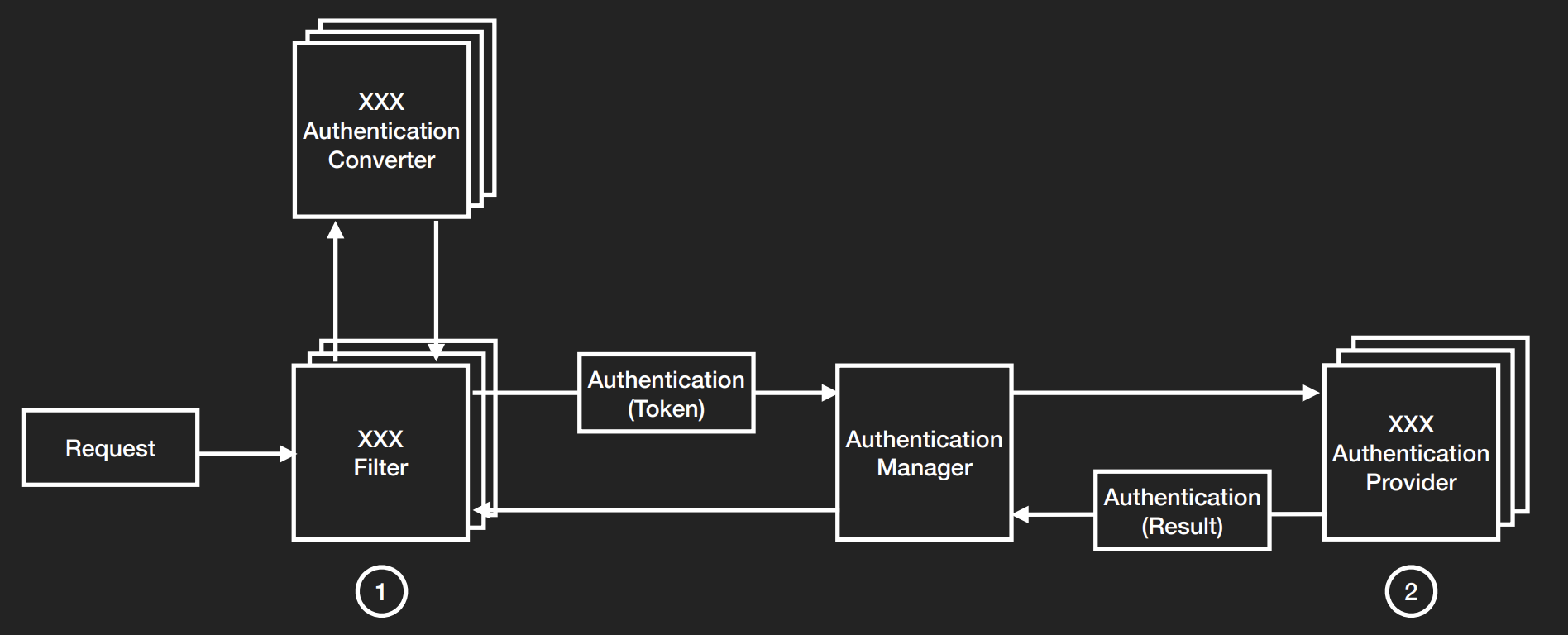
인증 전체 구조
UsernamePasswordAuthenticationFilter
POST : “/login” 경로에서 Form 기반 인증을 진행할 수 있도록,
multipart/form-data 형태의 username/password 데이터를 받아 인증 클래스에게 값을 넘겨주는 역할.
커스텀 SecurityFilterChain을 생성하면 자동 등록이 안되기 때문에 아래 구문을 통해서 필터를 활성화시켜야 한다.
http.formLogin(Customizer.withDefaults());
기능
- 폼 인증 처리
- AuthenticationManager를 호출해 authenticate() 실행
- 인증된 Authentication 객체를 SecurityContextHolder에 넣어주는 필터
구조
다른 필터들과 다르게 doFilter 메소드가 보이지 않는다.
=> 부모 클래스인 AbstractAuthenticationProcessingFilter 클래스에 존재한다.
왜냐면 인증 과정은 Form 방식이든, Json 방식이든 공통부가 많기 때문이다.
=> 사용자에게 데이터를 받아 인증 → 인증 결과를 SecurityContext에 저장 → 성공/실패 핸들
위 과정에서 사용자에게 데이터를 받아 인증하는 부분만 자식 클래스에서 구현해주면 된다.
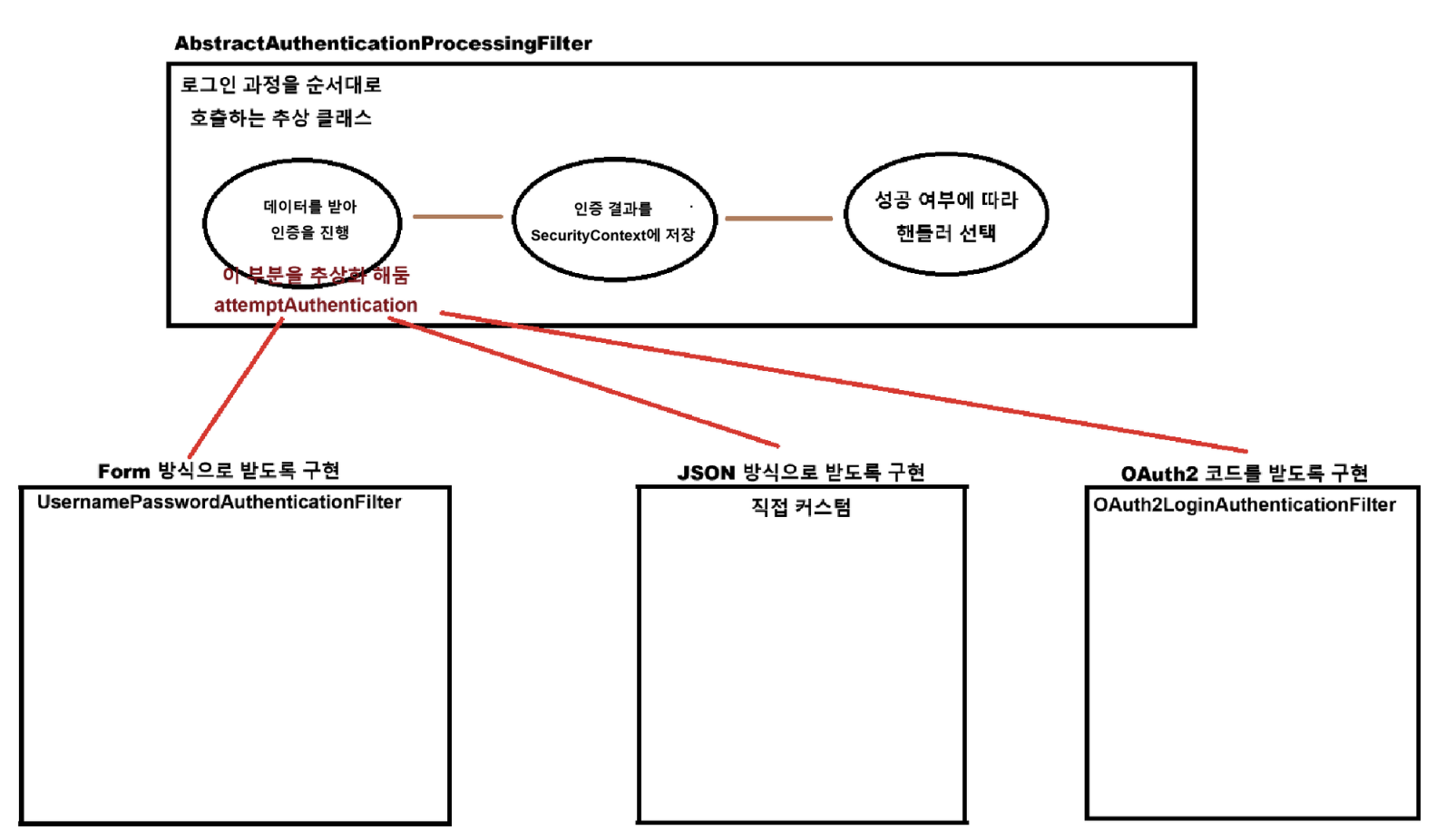
부모 클래스 AbstractAuthenticationProcessingFilter : 공통부 doFilter() 와 추상 메소드 attemptAuthentication()
public abstract class AbstractAuthenticationProcessingFilter extends GenericFilterBean {

    private void doFilter() {

        // 로그인 경로 요청인지 확인
        if (!requiresAuthentication(request, response)) {
            chain.doFilter(request, response);
            return;
        }

        // 로그인 과정 시도
        try {
            // 사용자로 부터 데이터를 받아 상황에 맞는 인증을 진행 (이 부분을 구현)
            Authentication authenticationResult = attemptAuthentication(request, response);

            if (authenticationResult == null) {
                return;
            }
            // 인증 결과가 존재하면 세션 전략에 따라 SecurityContext에 저장
            this.sessionStrategy.onAuthentication(authenticationResult, request, response);

            // 아래 값이 설정되어 있으면 다음 필터로 넘김
            if (this.continueChainBeforeSuccessfulAuthentication) {
                chain.doFilter(request, response);
            }

            // 로그인 성공 핸들러
            successfulAuthentication(request, response, chain, authenticationResult);
        }
        // 로그인 실패 핸들러
        catch (InternalAuthenticationServiceException failed) {
            this.logger.error("An internal error occurred while trying to authenticate the user.", failed);
            unsuccessfulAuthentication(request, response, failed);
        }
        catch (AuthenticationException ex) {
            unsuccessfulAuthentication(request, response, ex);
        }
    }

    public abstract Authentication attemptAuthentication(HttpServletRequest request, HttpServletResponse response)
		throws AuthenticationException, IOException, ServletException;
}
※ Basic 인증 방식은 GenericFilterBean이 아닌 OncePerRequestFilter 방식을 사용해서 위 추상 클래스를 상속 X
자식 클래스 UsernamePasswordAuthenticationFilter : attempAuthentication() 메소드를 인증 방식에 따라 구현
@Override
public Authentication attemptAuthentication(HttpServletRequest request, HttpServletResponse response) throws AuthenticationException {

	// 로그인 경로 요청인지 확인
	if (this.postOnly && !request.getMethod().equals("POST")) {
		throw new AuthenticationServiceException("Authentication method not supported: " + request.getMethod());
	}

	// 요청으로부터 multipart/form-data로 전송되는 username, password 획득
	String username = obtainUsername(request);
	username = (username != null) ? username.trim() : "";
	String password = obtainPassword(request);
	password = (password != null) ? password : "";

	// 인증을 위해 위 데이터를 인증 토큰에 넣음
	UsernamePasswordAuthenticationToken authRequest = UsernamePasswordAuthenticationToken.unauthenticated(username,
			password);
	// Allow subclasses to set the "details" property
	setDetails(request, authRequest);

	// username/password 기반 인증을 진행하는 AuthenticationManager에게 인증을 요청 후 응답
	return this.getAuthenticationManager().authenticate(authRequest);
}
AuthenticationManager
로그인이 수행되는 과정
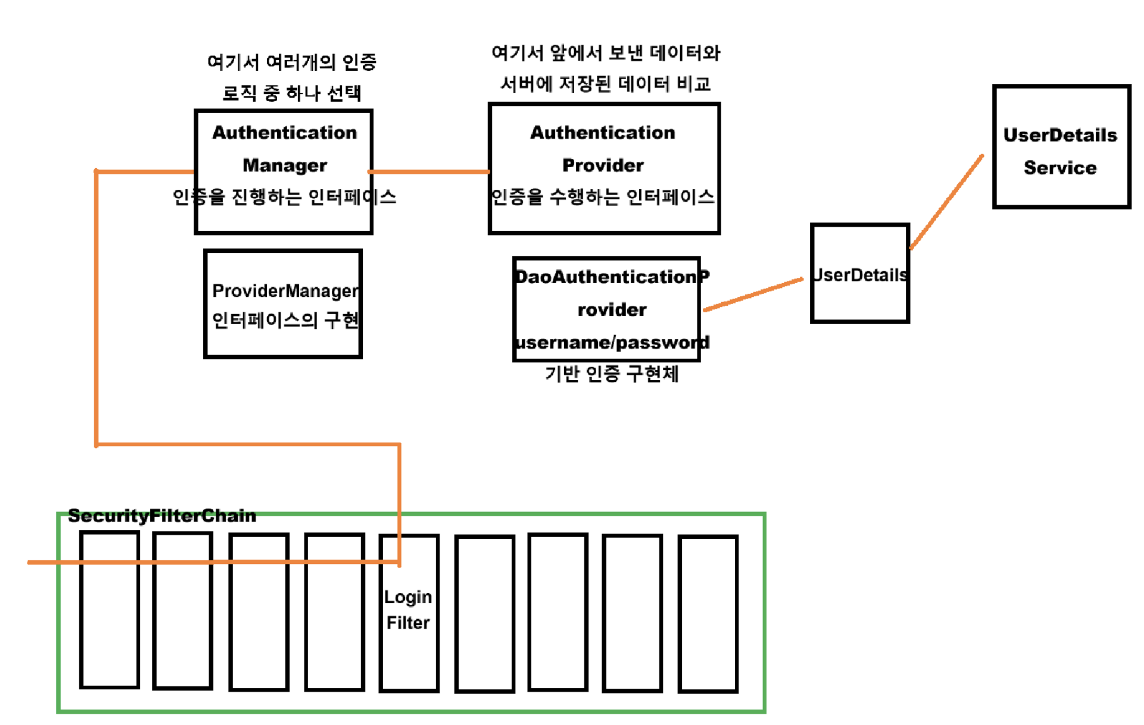
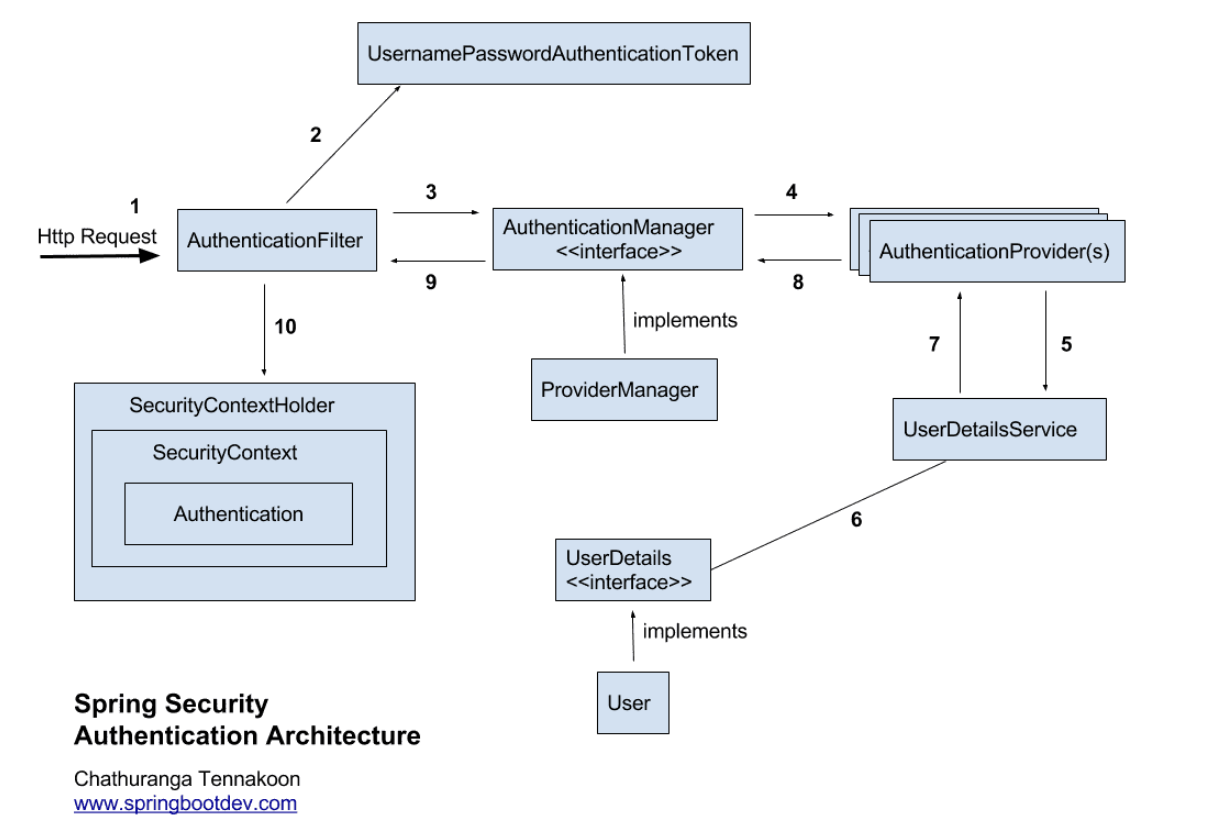
인증(Authentication)은 AuthenticationManager가 한다.
인자로 받은 Authentication(unauthenticated)이 유효한 인증인지 확인하고, Authentication(unauthenticated) 를 리턴.
인증을 확인하는 과정에서 비활성 계정, 잘못된 비번, 잠긴 계정 등의 에러를 던질 수 있다.
- 유효한 인증인지 확인
- 사용자가 입력한 password가 UserDetailsService를 통해 읽어온 UserDetails 객체에 들어있는 password와 일치하는지 확인 (BadCredentialException)
- 해당 사용자 계정이 잠겨 있진 않은지, 비활성 계정은 아닌지 등 확인 (LockedException, DisabledException)
- Authentication 객체를 리턴
- Authentication
- Principal : UserDetailsService에서 리턴한 User 객체
- Credentials
- GrantedAuthorities
- Authentication
※ AuthenticationManager 의 기본 구현체인 ProviderManager의 authenticate()를 디버거로 확인

ProviderManager 는 AuthenticationProvider에게 인증 과정을 위임한다.
인증 토큰 별 인증 방식이 다양하기 때문에, 실제 인증을 처리하는 Providers를 관리할 ProviderManger가 필요한 것이다.
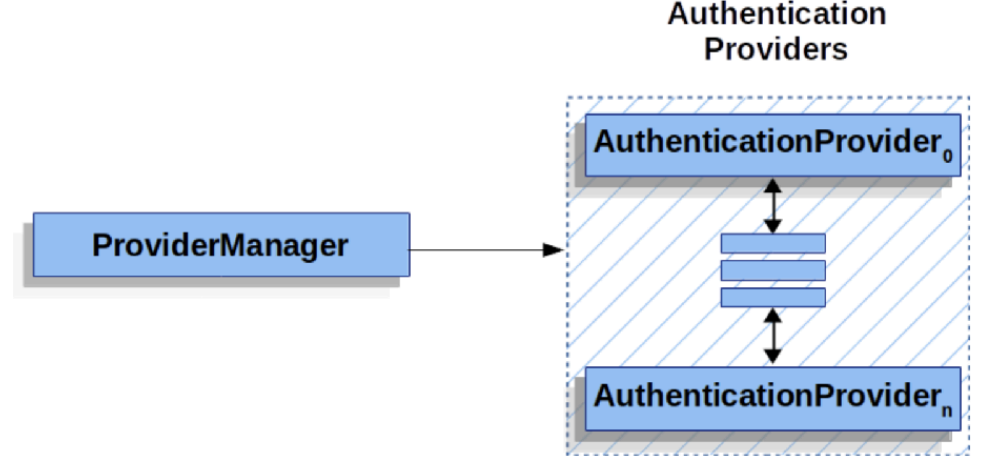
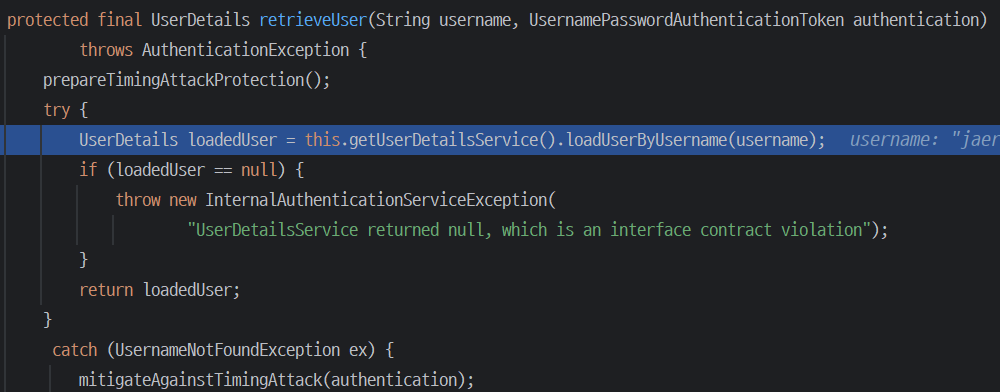
AnonymousAuthenticationProvider로는 form 인증 Authentication 타입인 UsernamePasswordAuthenticationToken을 처리하지 못함

그래서 parent 객체인 AbstractUserDetailsAuthenticationProvider에게 위임하여 DaoAuthenticationProvider로 처리하고,
거기서 UserDetailsService로부터 UserDetails를 load한다.
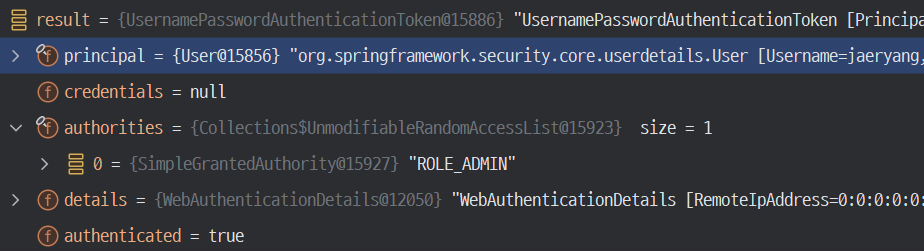
AuthenticationManager가 인증을 마친 뒤 리턴 받은 Authentication 객체의 행방은?
# 인증 시
- UsernamePasswordAuthenticationFilter 가 AuthenticationManager를 통해 인증
- 인증된 정보를 SecurityContext에 저장 및 SecurityContextHolder에 set
- 세션을 사용할 경우, SecurityContext는 HttpSessionSecurityContextRepository를 통해 HTTP 세션에 저장됨
# 인증 후 요청
- 요청이 끝나고 SecurityContextHolderFilter에서 SecurityContextHolder를 비워둠.
- 다시 요청이 올 경우SecurityContextHolderFilter 가 동작하면서, HttpSessionSecurityContextRepository를 사용해서 세션에서 SecurityContext 를 꺼내 SecurityContextHolder에서 저장.
즉, SecurityContextHolder.getContext()는 이 시점 이후부터 사용할 수 있다.
SecurityContextHolderFilter
DefaultSecurityFilterChain에 기본적으로 등록되는 필터로, 세 번째에 위치한다.
목적
1. 이전 요청을 통해 인증한 사용자 정보를 현재 요청의 SecurityContextHolder의 SecurityContext에 할당
2. 현재 요청이 끝나면 SecurityContext를 초기화
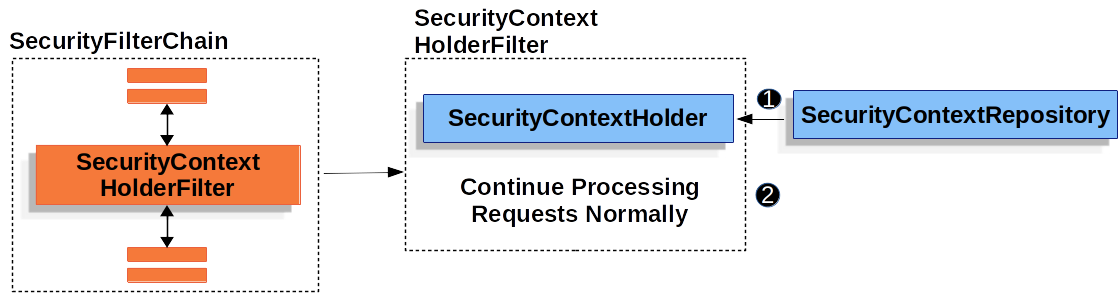
- 요청이 시작되면 새로운 SecurityContext가 생성되고, 요청 종료와 함께 사라진다.
Authentication 객체를 관리하는 SecurityContext는 사용자의 요청이 서버로 들어오면 생성되고, 처리가 끝난 후 응답되는 순간에 초기화된다. - 매 요청마다 인증을 하는게 아니고, SecurityContextRepository를 사용해 SecurityContext를 지속적으로 저장하고, 다음 요청 시 이를 복원하여 인증 상태를 유지한다.

기본 로직
0. 이전 요청에서 사용자가 로그인을 했고, stateless한 상태가 아니라면
서버의 세션(메모리) 또는 Redis 같은 저장 매체에 유저 정보가 있을 것이다.
1. 해당 저장 매체로부터 유저 정보를 가져온다. (SecurityContextRepository 에 위임, 존재하지 않는 경우 빈 객체 응답)
public class HttpSessionSecurityContextRepository implements SecurityContextRepository {

	public DeferredSecurityContext loadDeferredContext(HttpServletRequest request) {
		Supplier<SecurityContext> supplier = () -> this.readSecurityContextFromSession(request.getSession(false));
		return new SupplierDeferredSecurityContext(supplier, this.securityContextHolderStrategy);
	}

}
2. 이후 불러온 유저 정보를 SecurityContextHolder에 저장하고 다음 필터로 넘긴다.
3. 응답이 이뤄지면 SecurityContextHolder에 유저 정보 제거
private void doFilter(){
    //SecurityContext가 실제 필요할 때까지 미루는 DeferredSecurityContext
    Supplier<SecurityContext> deferredContext = this.securityContextRepository.loadDeferredContext(request);

    try {
        this.securityContextHolderStrategy.setDeferredContext(deferredContext);
        chain.doFilter(request, response);
    }
    finally {
        this.securityContextHolderStrategy.clearContext();
        request.removeAttribute(FILTER_APPLIED);
    }
}
SecurityContextRepository 인터페이스와 구현체들
세션, 레디스 등 기타 저장 매체로부터 유저 정보를 불러오는 구현 방식이 다르기 때문에 인터페이스를 두고 여러 구현체에 위임한다.
- HttpSessionSecurityContextRepository : 서버 세션 기반 구현체 (여러 요청 간에 인증 유지가 필요 시 사용)
- NullSecurityContextRepository : 보관 안해서 아무 작업을 하지 않을때 (JWT를 사용해서 STATELESS 관리 시)
- RequestAttributeSecurityContextRepository : HTTP request 저장 기반 구현체. (비동기 요청 혹은 일회성 요청 시)
- DelegatingSecurityContextRepository : 기본 설정, 동시 사용 필요 시
- 기타 : 직접 구현해서 SecurityFilterChain Bean을 통해 커스텀 등록
SecurityContextPersistenceFilter(deprecated) 와 SecurityContextHolderFilter의 차이
이전 클래스는 SecurityContext가 변경되면 변경된 부분을 반영해 세션이나 레디스와 같은 저장소에 SecurityContextRepository로 저장했지만 현재 클래스는 변경이 있어 저장하지 않는다.

SecurityContextHolderFilter는 요청 끝에 SecurityContext를 저장하지 않기 때문에 (saveContext() 생략됨)
아래와 같이 변경 사항을 명시적으로 반영해줘야 한다.
HttpSessionSecurityContextRepository에 아래와 같이 세션에 저장하고 있다. 이렇게 세션 값을 변경해주면 된다.
private void setContextInSession(SecurityContext context, HttpSession session) {
    if (session != null)
        session.setAttribute(this.springSecurityContextKey, context);
}
참고 자료 & 이미지 출처
스프링부트 시큐리티 (백기선 님)
https://www.devyummi.com/page?id=6695e062d31df967ae77c97b
개발자 유미 | 커뮤니티
www.devyummi.com
https://spring.io/projects/spring-security
Spring Security
Spring Security is a powerful and highly customizable authentication and access-control framework. It is the de-facto standard for securing Spring-based applications. Spring Security is a framework that focuses on providing both authentication and authoriz
spring.io
'Spring > Spring Security (feat. JWT, OAuth2)' 카테고리의 다른 글
| 내부 구조 - Security Filters (0) | 2024.11.02 |
|---|---|
| 내부 구조 - Authorization (인가) (0) | 2024.11.02 |
| 내부 구조 - 필터와 사용자/인증 정보 (0) | 2024.10.30 |
| 사용, 테스트 방법 (0) | 2024.10.30 |
| 스프링 시큐리티 전체 구조 개요 (0) | 2024.10.28 |


