
| 일 | 월 | 화 | 수 | 목 | 금 | 토 |
|---|---|---|---|---|---|---|
| 1 | 2 | 3 | 4 | 5 | 6 | |
| 7 | 8 | 9 | 10 | 11 | 12 | 13 |
| 14 | 15 | 16 | 17 | 18 | 19 | 20 |
| 21 | 22 | 23 | 24 | 25 | 26 | 27 |
| 28 | 29 | 30 |
- dockerhub
- JdbcTemplate
- Spring Data JPA
- docker
- Spring
- JWT
- Routing Key
- securitycontextholderfilter
- 페이징
- mybatis
- MSA
- JPA
- 서블릿 컨테이너
- Web
- 쿠버네티스
- redis
- @Transactional
- 스프링 부트
- JPQL
- CORS
- Dead Letter Queue
- 컨테이너
- AWS
- docker compose
- DLQ
- 지연 로딩
- @ComponentScan
- Spring Container
- kafka
- DI
- Today
- Total
look-forest
내부 구조 - Security Filters 본문
기타 필터들에 대해서 정리해보자.
Security filter chain: [
DisableEncodeUrlFilter
WebAsyncManagerIntegrationFilter
SecurityContextHolderFilter
HeaderWriterFilter
CsrfFilter
LogoutFilter
UsernamePasswordAuthenticationFilter
DefaultLoginPageGeneratingFilter
DefaultLogoutPageGeneratingFilter
BasicAuthenticationFilter
RequestCacheAwareFilter
SecurityContextHolderAwareRequestFilter
AnonymousAuthenticationFilter
ExceptionTranslationFilter
AuthorizationFilter
]
Async 웹 MVC를 지원하는 필터: WebAsyncManagerIntegrationFilter
스프링 MVC의 Async 기능(핸들러에서 Callable을 리턴할 수 있는 기능)을 사용할 때에도 SecurityContext를 공유하도록 도와주는 필터.
- PreProcess: SecurityContext를 설정한다.
- Callable: 비록 다른 쓰레드지만 그 안에서는 동일한 SecurityContext를 참조할 수 있다.
- PostProcess: SecurityContext를 정리(clean up)한다.
@GetMapping("/asyncHandler")
@ResponseBody
public Callable<String> asyncHandler() {
    log("asyncHandler");
    return new Callable<String>() {
        @Override
        public String call() throws Exception {
            log("Callable");
            return "Async Handler";
        }
    };
}
※ 스프링 시큐리티와 @Async
@Async를 사용한 서비스를 호출하는 경우
- 쓰레드가 다르기 때문에 SecurityContext를 공유받지 못한다.
따라서 SecurityContextHolder의 전략을 변경해줘야 한다.
| SecurityContextHolder.setStrategyName(SecurityContextHolder.MODE_INHERITABLETHREADLOCAL); |
- SecurityContext를 자식 쓰레드에도 공유하는 전략.
- @Async를 처리하는 쓰레드에서도 SecurityContext를 공유받을 수 있다.
SecurityContext 영속화 필터: SecurityContextHolderFilter
SecurityContextRepository를 사용해서 기존의 SecurityContext를 읽어오거나 초기화 한다.
- 인증 필터를 거치기 전에, 이미 인증한 이력이 있는 사용자인지 판단 후 SecurityContext를 읽어오거나 초기화한다.
- 기본으로 사용하는 전략은 HTTP Session을 사용한다.
- 응답이 반환될 때 Context를 초기화 한다.
private void doFilter(HttpServletRequest request, HttpServletResponse response, FilterChain chain) throws ServletException, IOException {
    if (request.getAttribute(FILTER_APPLIED) != null) {
        chain.doFilter(request, response);
    } else {
        request.setAttribute(FILTER_APPLIED, Boolean.TRUE);
        Supplier<SecurityContext> deferredContext = this.securityContextRepository.loadDeferredContext(request);

        try {
            this.securityContextHolderStrategy.setDeferredContext(deferredContext);
            chain.doFilter(request, response);
        } finally {
            this.securityContextHolderStrategy.clearContext();
            request.removeAttribute(FILTER_APPLIED);
        }

    }
}
시큐리티 관련 헤더 추가하는 필터: HeaderWriterFilter
응답 헤더에 시큐리티 관련 헤더를 추가해주는 필터
- XContentTypeOptionsHeaderWriter: 마임 타입 스니핑 방어.
- XXssProtectionHeaderWriter: 브라우저에 내장된 XSS 필터 적용.
- CacheControlHeadersWriter: 캐시 히스토리 취약점 방어.
- HstsHeaderWriter: HTTPS로만 소통하도록 강제.
- XFrameOptionsHeaderWriter: clickjacking 방어.
CSRF 어택 방지 필터 : CsrfFilter
CSRF(Cross Site Request Forgery)는 인증된 유저의 계정을 사용해 악의적인 변경 요청을 만들어 보내는 기법이다.
CORS(Cross-Origin Resource Share)을 사용할 경우, 타 도메인에서 보내오는 요청을 허용하므로 특히 주의해야 한다.

Csrf 필터는 의도한 사용자만 리소스를 변경할 수 있도록 허용하는 필터로, CSRF 토큰을 사용하여 방지한다.
스프링 시큐리티의 CSRF 검증 방식은 토큰 방식이며 GET 요청 시 토큰을 서버 저장소에 저장 후 클라이언트에게도 전송하며, 그 후 해당하는 요청에 대해서 서버에 저장된 토큰과 비교 검증을 진행한다.
(HTTP 메소드 중 GET, HEAD, TRACE, OPTIONS 메소드를 제외한 요청에 대해서 검증을 진행한다.)



주요 로직
public final class CsrfFilter extends OncePerRequestFilter {
    protected void doFilterInternal(HttpServletRequest request, HttpServletResponse response, FilterChain filterChain)
            throws ServletException, IOException {

        // 토큰을 토큰 저장소로 부터 불러옴
        DeferredCsrfToken deferredCsrfToken = this.tokenRepository.loadDeferredToken(request, response);
        // 다음 요청을 위해 request에 추가
        request.setAttribute(DeferredCsrfToken.class.getName(), deferredCsrfToken);
        this.requestHandler.handle(request, response, deferredCsrfToken::get);

        // HTTP 메소드 확인 후 CSRF 검증이 필요 없는 메소드면 다음 필터로 넘김
        if (!this.requireCsrfProtectionMatcher.matches(request)) {
            if (this.logger.isTraceEnabled()) {
                this.logger.trace("Did not protect against CSRF since request did not match "
                        + this.requireCsrfProtectionMatcher);
            }
            filterChain.doFilter(request, response);
            return;
        }

        // 서버 저장 토큰
        CsrfToken csrfToken = deferredCsrfToken.get();
        // 클라이언트에서 온 토큰
        String actualToken = this.requestHandler.resolveCsrfTokenValue(request, csrfToken);

        // 클라이언트로 부터 온 토큰과 서버 저장소의 토큰을 비교 검증
        if (!equalsConstantTime(csrfToken.getToken(), actualToken)) {
            boolean missingToken = deferredCsrfToken.isGenerated();
            this.logger
                .debug(LogMessage.of(() -> "Invalid CSRF token found for " + UrlUtils.buildFullRequestUrl(request)));
            AccessDeniedException exception = (!missingToken) ? new InvalidCsrfTokenException(csrfToken, actualToken)
                    : new MissingCsrfTokenException(actualToken);
            this.accessDeniedHandler.handle(request, response, exception);
            return;
        }

        // 다음 필터로 넘김
        filterChain.doFilter(request, response);
    }
}
CsrfTokenRepository
CSRF 토큰의 생성 및 관리는 CsrfTokenRepository라는 인터페이스를 정의하고 그것을 구현한 클래스에게 위임 시킨다.
- HttpSessionCsrfTokenRepository : 서버 세션에 토큰을 저장 관리함 (기본값)
- CookieCsrfTokenRepository : 쿠키에 토큰을 저장 관리함
CSRF 토큰 클라이언트측으로 발급
기본 동작은 SSR 세션 방식으로 설정되어 있다. (STATELESS REST API에서는 사용할 일이 거의 없기 때문)
Controller단에서 VIEW단 응답시 HTML form 영역에 서버에 저장되어 있는 _csrf 토큰 값을 넣어주면 된다.
CSRF Referer
STATELESS한 API 서버를 구축하게 된다면 JSESSION에 대한 서버 세션이 상태를 가지지 않기 때문에 CSRF 공격 위험 자체가 없다. 따라서 csrf 설정을 disable하는 것이 대부분의 구현이다.
하지만 JWT를 쿠키에 저장할 경우 CSRF 공격의 위험이 있을 수 있기 때문에 활성화하는 것이 좋다.
다만 CSRF 토큰을 발급할 VIEW 페이지와 같은 로직이 없기 때문에 토큰 방식이 아닌 Referer 방식을 사용한다.
이 방식은 HTTP Referer 헤더를 통해 요청의 출발점, 이전 URL등을 검증한다.
로그아웃 처리 필터: LogoutFilter
인증 후 생성되는 사용자 식별 정보에 대해 로그아웃 핸들러를 돌며 로그아웃을 수행하는 필터.
여러 LogoutHandler를 사용하여 로그아웃 시 필요한 처리를 하며 이후에는 LogoutSuccessHandler를 사용하여 로그아웃 후처리를 한다.
(기본적으로 세션 방식에 대한 로그아웃 설정이 되어 있기 때문에 JWT 방식이나 추가할 로직이 많을 경우 커스텀해야)
주요 로직
public class LogoutFilter extends GenericFilterBean {
    private void doFilter() {
        // 로그아웃 요청인지 확인
        if (requiresLogout(request, response)) {
            Authentication auth = this.securityContextHolderStrategy.getContext().getAuthentication();

            // 등록된 로그아웃 핸들러들을 동작
            this.handler.logout(request, response, auth);

            // 로그아웃 핸들러 수행 후 성공 핸들러 동작
            this.logoutSuccessHandler.onLogoutSuccess(request, response, auth);
            return;
        }

        // 로그아웃 요청이 아니면 다음 필터로
        chain.doFilter(request, response);
    }
}
LogoutHandler
CompositeLogoutHandler 클래스에 등록되어 있는 모든 Logout 핸들러를 순회하며 로그아웃을 수행.
- SecurityContextLogoutHandler : SecurityContextHolder에 존재하는 SecurityContext 초기화
- CookieClearingLogoutHandler : SecurityFilterChain의 logout 메소드에서 지정한 쿠키 삭제
- HeaderWriterLogoutHandler : 클라이언트에게 반환될 헤더 조작
- LogoutSuccessEventPublishingLogoutHandler : 로그아웃 성공 후 특정 이벤트 실행
LogoutSuccessHandler
로그아웃이 성공한 뒤 URL 리디렉션과 같은 특정 작업을 수행하기 위한 핸들러로 위의 Logout 핸들러와 다르다.
- SimplUrlLogoutSuccessHandler
폼 인증 처리 필터: UsernamePasswordAuthenticationFilter
- 사용자가 폼에 입력한 username과 password로 Authentication(authRequest, unauthenticated)을 만들고AuthenticationManager를 사용하여 인증을 시도한다.
- AuthenticationManager (ProviderManager)는 여러 AuthenticationProvider를 사용하여 인증을 시도하는데, 그 중에 DaoAuthenticationProvider는 UserDetailsServivce를 사용하여 UserDetails 정보를 가져와 사용자가 입력한 password와 비교한다. 그리고 Authentication(Token, authResult, authenticated) 반환한다.
- 성공적으로 인증이 끝나면 SecurityContextHolder에 인증 정보를 저장하고, SecurityContextRepository에 저장 (Holder에서 sessionId로 읽어서 복원하기 위해. stateful)
로그인/로그아웃 페이지를 생성해주는 필터 : DefaultLogin/LogoutPageGeneratingFilter
GET /login 요청을 처리할 수 있는 기본 로그인 페이지를 생성해주는 필터.
로그인 설정에 따른 활성화
- form 로그인
- oauth2 로그인
- saml2 로그인
아래와 같이 커스텀 로그인 페이지를 사용할 경우 DefaultLogin/LogoutPageGeneratingFilter는 제외된다.
 @Bean
public SecurityFilterChain securityFilterChain(HttpSecurity http) throws Exception {
    //기본 사용
    //http.formLogin(Customizer.withDefaults());

    //커스텀 로그인 페이지 사용 (로그인, 로그아웃 페이지 생성 필터 사라짐)
    http.formLogin(login -> login
                                .loginPage("/login")
                                .permitAll());


    http.logout(logout -> logout
                                .logoutUrl("/logout")
                                .logoutSuccessUrl("/"));
 return http.build();
}
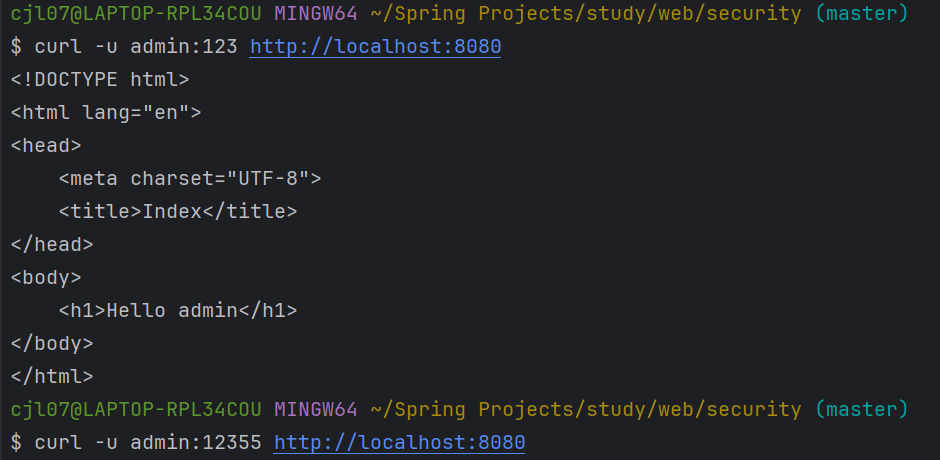
Basic 인증 처리 필터: BasicAuthenticationFilter
Basic 인증이란?
- 요청 헤더에 username와 password를 실어 보내면 브라우저 또는 서버가 그 값을 읽어서 인증하는 방식.
예) Authorization: Basic QWxhZGRpbjpPcGVuU2VzYW1l (username:password 를 BASE 64로 인코딩) - 보통, 브라우저 기반 요청이 클라이언트의 요청을 처리할 때 자주 사용.
- 보안에 취약하기 때문에 반드시 HTTPS를 사용할 것을 권장.
인증 후 SecurityContextRepository에 인증 정보를 보관하지 않기 때문에 stateless하다.
요청 캐시 필터: RequestCacheAwareFilter
현재 요청과 관련 있는 캐시된 요청이 있는지 찾아서 적용하는 필터.
- 캐시된 요청이 없다면, 현재 요청 처리
- 캐시된 요청이 있다면, 해당 캐시된 요청 처리
예) 관리자 페이지 요청 -> 로그인 페이지로 리다이렉트 하면서 최초 요청 캐시 -> 로그인 후 캐시된 요청 처리(관리자 p)
시큐리티 관련 서블릿 스팩 구현 필터: SecurityContextHolderAwareRequestFilter
시큐리티 관련 서블릿 API를 구현해주는 필터
익명 인증 필터: AnonymousAuthenticationFilter
현재 SecurityContext에 Authentication이 null이면 “익명 Authentication”을 만들어 넣어준다.
세션 관리 필터: SessionManagementFilter
세션 변조 방지 전략 설정: sessionFixation
- changeSessionId (서브릿 3.1+ 컨테이너 사용시 기본값)
유효하지 않은 세션을 리다이렉트 시킬 URL 설정
- invalidSessionUrl
동시성 제어: maximumSessions
- 추가 로그인을 막을지 여부 설정 수반 (기본값, false)
세션 생성 전략: sessionCreationPolicy
- IF_REQUIRED (기본 값)
- NEVER (어차피 서버의 세션을 쓴다)
- STATELESS ( API 서버 등에서 세션을 정말 사용하지 않을 경우)
- ALWAYS
http.sessionManagement(auth -> auth
        .maximumSessions(1) //다중 로그인 허용 개수
        .maxSessionsPreventsLogin(true) //다중 로그인 개수 초과 시 처리 방법 (true: 추가 로그인 허용 안함, 기본 false)
);

http.sessionManagement(auth -> auth
        .sessionFixation().changeSessionId() //세션 고정 보호 (전략: 세션 Id 변경)
);

http.sessionManagement(auth -> auth
        .sessionCreationPolicy(SessionCreationPolicy.STATELESS) //세션 사용 안함
);
예외 처리 : ExceptionTranslationFilter
이 필터 이후에 발생하는 인증, 인가 에러 처리를 담당하는 필터
- AuthenticationEntryPoint
- AccessDeniedHandler
예외 처리는 호출한 필터가 진행할 수 있다 => ExceptionTranslatorFilter -> AuthorizationFilter 순서인 이유
(UsernamePasswordAuthenticationFilter에서 발생한 인증 에러는 AbstractAuthenticationProcessingFilter 에서 처리)
- AuthenticationException -> AuthenticationEntryPoint (인증 안 한 사용자가 인증할 수 있도록 로그인 페이지로)
- AccessDeniedException -> AccessDeniedHanlder (에러 페이지를 보여줌) or AuthenticationEntryPoint
private void doFilter(){
	try {
		chain.doFilter(request, response);
	}
	catch (Exception ex) {
		handleSpringSecurityException(request, response, chain, securityException);
	}
}


private void handleSpringSecurityException(HttpServletRequest request, HttpServletResponse response,
       FilterChain chain, RuntimeException exception) throws IOException, ServletException {
    if (exception instanceof AuthenticationException) {
       handleAuthenticationException(request, response, chain, (AuthenticationException) exception);
        // -> sendStartAuthentication(request, response, chain, exception);
    }
    else if (exception instanceof AccessDeniedException) {
       handleAccessDeniedException(request, response, chain, (AccessDeniedException) exception);
       // -> sendStartAuthentication or accessDeniedHandler.handle(request, response, exception);
    }
}
ExceptionHandler 커스텀 설정
http.exceptionHandling(exception -> exception
            //.accessDeniedPage("/access-denied")
            .accessDeniedHandler((request, response, accessDeniedException) -> {
                UserDetails principal = (UserDetails) SecurityContextHolder.getContext().getAuthentication().getPrincipal();
                log.info("{} is denied to access {}", principal.getUsername(), request.getRequestURI());
                response.sendRedirect("/access-denied");
            })
);
※ 로그인을 안한 경우 AuthenticationEntryPoint 정의
http.exceptionHandling(exception -> exception
                .authenticationEntryPoint((request, response, accessDeniedException) -> {
                    response.setContentType("application/json");
                    response.setCharacterEncoding("UTF-8");
                    response.setStatus(403);
                    response.getWriter().println(accessDeniedException.getMessage());
                }));
인가 처리 필터: AuthorizationFilter
SecurityFilterChain의 authorizeHttpRequests()를 통해 설정한 configAttribute를 기준으로,
AuthorizationManager를 사용하여 인가를 처리한다.
public void doFilter() {
	// 인가 작업 수행
	try {
		// 인가 매니저를 통해 인가 확인
		AuthorizationDecision decision = this.authorizationManager.check(this::getAuthentication, request);

		if (decision != null && !decision.isGranted()) {
			// 인가 권한이 안맞다면 예외 발생
			throw new AccessDeniedException("Access Denied");
		}
		chain.doFilter(request, response);
	}
	finally {
		// 최종적으로 모든 작업 처리 후 사용 기록 삭제
		request.removeAttribute(alreadyFilteredAttributeName);
	}
}
토큰 기반 인증 필터 : RememberMeAuthenticationFilter (추가 기능)
세션이 사라지거나 만료가 되더라도 쿠키 또는 DB를 사용하여 저장된 토큰 기반으로 인증을 지원하는 필터.
'로그인 상태 유지하기' 같은 기능 구현 시 사용.
세션 값이 없을 경우 remember-me 토큰을 활용해서 인증 후회원 정보 조회 후 SecurityContextHolder에 넣어준다.
//로그인 유지하기 (기본 값 2주)
http.rememberMe(httpSecurityRememberMeConfigurer ->
        httpSecurityRememberMeConfigurer.rememberMeParameter("remember-me"));
커스텀 시큐리티 필터 추가하기
1. 필터를 상속받아 만든다. (GenericFilterBean, OncePerRequestFilter)
public class LoggingFilter extends GenericFilterBean {

    private final Logger logger = LoggerFactory.getLogger(this.getClass());

    @Override
    public void doFilter(ServletRequest servletRequest, ServletResponse servletResponse, FilterChain filterChain) throws IOException, ServletException {
        //성능 측정
        StopWatch stopWatch = new StopWatch();
        stopWatch.start((((HttpServletRequest) servletRequest).getRequestURI()));

        filterChain.doFilter(servletRequest, servletResponse);

        stopWatch.stop();
        logger.info(stopWatch.prettyPrint());
    }
}
2. 추가 설정
http.addFilterBefore(new LoggingFilter(), WebAsyncManagerIntegrationFilter.class);참고 자료 & 이미지 출처
스프링부트 시큐리티 (백기선 님)
https://www.devyummi.com/page?id=6695e062d31df967ae77c97b
개발자 유미 | 커뮤니티
www.devyummi.com
https://spring.io/projects/spring-security
Spring Security
Spring Security is a powerful and highly customizable authentication and access-control framework. It is the de-facto standard for securing Spring-based applications. Spring Security is a framework that focuses on providing both authentication and authoriz
spring.io
'Spring > Spring Security (feat. JWT, OAuth2)' 카테고리의 다른 글
| 스프링 시큐리티 JWT (0) | 2024.11.14 |
|---|---|
| 기타 : 메소드 시큐리티, 연동(웹 MVC, 타임리프, 스프링 데이터 JPA) (1) | 2024.11.10 |
| 내부 구조 - Authorization (인가) (0) | 2024.11.02 |
| 내부 구조 - Authentication (인증) (1) | 2024.11.02 |
| 내부 구조 - 필터와 사용자/인증 정보 (0) | 2024.10.30 |


