
| 일 | 월 | 화 | 수 | 목 | 금 | 토 |
|---|---|---|---|---|---|---|
| 1 | 2 | 3 | 4 | 5 | 6 | |
| 7 | 8 | 9 | 10 | 11 | 12 | 13 |
| 14 | 15 | 16 | 17 | 18 | 19 | 20 |
| 21 | 22 | 23 | 24 | 25 | 26 | 27 |
| 28 | 29 | 30 |
- 지연 로딩
- 페이징
- AWS
- docker compose
- redis
- Spring Data JPA
- 쿠버네티스
- Spring Container
- 컨테이너
- securitycontextholderfilter
- @Transactional
- JdbcTemplate
- Web
- DLQ
- CORS
- kafka
- JPQL
- docker
- Spring
- DI
- @ComponentScan
- 스프링 부트
- mybatis
- 서블릿 컨테이너
- dockerhub
- Dead Letter Queue
- JPA
- JWT
- MSA
- Routing Key
- Today
- Total
look-forest
스프링 시큐리티 JWT 본문
JWT 방식으로 인증을 진행하는 스프링 시큐리티 구현 방법을 알아보자.
1. JWT에 대하여
2. JWT 방식 스프링 시큐리티 구현
3. CORS에 대하여
JWT란
JWT(JSON Web Token)는 웹, 모바일 애플리케이션에서 인증과 권한 부여를 위해 자주 사용되는 JSON 기반의 토큰.
JWT 구성
- 헤더(Header): JWT의 유형과 해싱 알고리즘을 지정.
- 페이로드(Payload): 사용자 정보나 추가적인 데이터를 담고 있다. (사용자의 ID, 역할(role), 토큰의 유효기간 등)
- 서명(Signature): 헤더와 페이로드를 합친 후 지정한 비밀 키를 이용해 서명하여 변조 방지를 위해 사용됨(검증용)
※ JWT 암호화 방식은 크게 단방향/양방향이 있고, 양방향에는 대칭키/비대칭키 방식이 있다.

JWT의 특징
내부 정보를 단순 BASE64 방식으로 인코딩하기 때문에 외부에서 쉽게 디코딩 할 수 있다.
따라서 외부에서 열람해도 되는 정보를 담아야하며, 토큰 자체의 발급처를 확인하기 위해서 사용한다.
서버는 토큰 자체만으로 사용자를 식별하고 검증할 수 있으므로 세션을 관리할 필요가 없다.
JWT를 사용하는 이유
- STATELESS를 위해서 사용하는 것이 아니다.
JWT가 사용된 주 이유는 결국 모바일 앱의 등장이다. 모바일 앱의 특성상 주로 JWT 방식으로 인증/인가를 진행한다.결국 STATLESS는 부수적인 효과인 것이다.
모바일 앱에서는 HTTPS가 필수라 JWT 탈취 우려가 거의 없기 때문에, 앱단에서 로그아웃을 진행하여 JWT 자체를 제거해버리면 서버측에선 추가 조치가 필요 없다. - 장기간 동안 로그인 상태를 유지하려고 세션 설정을 하면 서버 측 부하가 많이 가기 때문에 JWT 방식 이용을 고려해볼 수 있다.
JWT 발급 및 검증 클래스 구현
JWT 발급과 검증을 담당할 클래스가 필요하다.
- 로그인시 → 성공 → JWT 발급
- 접근시 → JWT 검증
암호화 키 저장
암호화 키는 하드코딩 방식으로 구현 내부에 탑재하는 것을 지양하기 때문에 변수 설정 파일에 저장한다.

@Component
public class JWTUtil {

    private SecretKey secretKey; //secret 문자열을 기반으로 객체 키를 만듦

    public JWTUtil(@Value("${my.jwt.secret}") String secret) {
        secretKey = new SecretKeySpec(secret.getBytes(StandardCharsets.UTF_8), Jwts.SIG.HS256.key().build().getAlgorithm());
    }

    /* 검증 */
    public String getUsername(String token) {
        return Jwts.parser().verifyWith(secretKey).build().parseSignedClaims(token).getPayload().get("username", String.class);
    }

    public String getRole(String token) {
        return Jwts.parser().verifyWith(secretKey).build().parseSignedClaims(token).getPayload().get("role", String.class);
    }

    public Boolean isExpired(String token) {
        return Jwts.parser().verifyWith(secretKey).build().parseSignedClaims(token).getPayload().getExpiration().before(new Date());
    }

    /* 토큰 생성 */
    public String createJwt(String username, String role, Long expiredMs) {
        return Jwts.builder()
                .claim("username", username)
                .claim("role", role)
                .issuedAt(new Date(System.currentTimeMillis()))
                .expiration(new Date(System.currentTimeMillis() + expiredMs))
                .signWith(secretKey)
                .compact();
    }
}
JWT 방식으로 인증을 진행하는 스프링 시큐리티 구현
JWT 인증 방식 시큐리티 동작 원리 개요
- 회원가입 : 내부 회원 가입 로직은 세션 방식과 JWT 방식의 차이가 없다.
- 로그인 (인증) : 세션 방식은 서버 세션이 유저 정보를 저장하지만, JWT 방식은 토큰을 생성하여 응답한다.
- 경로 접근 (인가) : JWT Filter를 통해 요청의 헤더에서 JWT를 찾아 검증하고 일시적으로 요청에 대한 Session을 생성한다. (생성된 세션은 요청이 끝나면 소멸됨)
JWT 필수 의존성 추가
JWT 토큰을 생성하고 관리하기 위해 JWT 의존성을 필수적으로 설정
dependencies {
    implementation 'io.jsonwebtoken:jjwt-api:0.12.3'
    implementation 'io.jsonwebtoken:jjwt-impl:0.12.3'
    implementation 'io.jsonwebtoken:jjwt-jackson:0.12.3'
}
SecurityConfig 클래스 설정
JWT를 통한 인증/인가를 위해서 세션을 STATELESS 상태로 설정하는 것이 중요하다.
//csrf disable : 세션을 stateless 상태로 관리하므로 필요 없음.
http.csrf(AbstractHttpConfigurer::disable);

//세션 설정
http.sessionManagement(session -> session
                .sessionCreationPolicy(SessionCreationPolicy.STATELESS));
인증 구현
과정
- 아이디, 비밀번호 검증을 위한 커스텀 필터 작성 및 SecurityConfig에 등록 (기존 필터 상속)
- DB에 저장되어 있는 회원 정보를 기반으로 검증할 로직 작성 (UserDetailsService)
- 로그인 성공시 JWT를 반환할 success 핸들러 생성 (응답 헤더에 반환)
1. 로그인 필터 구현
Form 로그인 방식에서는 UsernamePasswordAuthentication 필터에서 회원 검증을 진행을 시작한다.
(UsernamePasswordAuthenticationFilter가 호출한 AuthenticationManager를 통해 진행하며 DB에서 조회한 데이터를 UserDetailsService를 통해 받음)
JWT 기반 인증 방식에서는 SecurityConfig에서 formLogin 방식을 disable 했기 때문에 기본적으로 활성화 되어 있는 UsernamePasswordAuthenticationFilter 필터는 동작하지 않는다.
따라서 로그인을 진행하기 위해서 필터를 커스텀하여 등록해야 한다.
1. 로그인 검증을 위한 커스텀 UsernamePasswordAuthentication 필터 작성
@RequiredArgsConstructor
public class LoginFilter extends UsernamePasswordAuthenticationFilter {

    private final AuthenticationManager authenticationManager;

    @Override
    public Authentication attemptAuthentication(HttpServletRequest request, HttpServletResponse response) throws AuthenticationException {
        String username = obtainUsername(request);
        String password = obtainPassword(request);

        UsernamePasswordAuthenticationToken authToken = new UsernamePasswordAuthenticationToken(username, password, null);

        return authenticationManager.authenticate(authToken);
    }
2. SecurityConfig에 커스텀 로그인 필터 등록
@RequiredArgsConstructor
@Configuration
@EnableWebSecurity
public class SecurityConfig {

    private final AuthenticationConfiguration authenticationConfiguration;

    @Bean
    public AuthenticationManager authenticationManager(AuthenticationConfiguration configuration) throws Exception {
        return configuration.getAuthenticationManager();
    }

    @Bean
    public SecurityFilterChain securityFilterChain(HttpSecurity http) throws Exception {

        ...

        http.addFilterAt(new LoginFilter(authenticationManager(authenticationConfiguration))
                        , UsernamePasswordAuthenticationFilter.class);
        ...
    }
}
2. 로그인 검증 로직 구현
AuthenticationManager 가 인증 시 사용할 UserDetailsService 구현
@RequiredArgsConstructor
@Service
public class CustomUserDetailsService implements UserDetailsService {

    private final UserRepository userRepository;

    @Override
    public UserDetails loadUserByUsername(String username) throws UsernameNotFoundException {
        UserEntity userEntity = userRepository.findByUsername(username)
                .orElseThrow(() -> new UsernameNotFoundException("Username not found"));

        return new CustomUserDetails(userEntity);
    }
}
3. 로그인 성공 시 JWT 발급
로그인 성공 시 로그인 필터의 successfulAuthentication() 메소드를 통해 header에 JWT 발급 토큰을 응답.
@Override
protected void successfulAuthentication(HttpServletRequest request, HttpServletResponse response,
		FilterChain chain, Authentication authResult) throws IOException, ServletException {
    //JWT 발급
    CustomUserDetails userDetails = (CustomUserDetails) authResult.getPrincipal();
    String username = userDetails.getUsername();
    String authority = userDetails.getAuthorities().iterator().next().getAuthority();
    long expiredMs = 60 * 60 * 10L;

    String token = jwtUtil.createJwt(username, authority, expiredMs);

    //발급 토큰 응답
    response.addHeader("Authorization", "Bearer " + token);
}
JWT 검증 필터 구현
로그인 토큰을 발급 받은 후 요청할 때,
스프링 시큐리티 filter chain에 요청에 담긴 JWT를 검증하기 위한 커스텀 필터를 등록해야 한다. (로그인 필터 전)
해당 필터를 통해 요청 헤더 Authorization 키에 JWT가 존재하는 경우 JWT를 검증하고 강제로 SecurityContextHolder에 세션을 생성한다. (이 세션은 STATLESS 상태로 관리되기 때문에 해당 요청이 끝나면 소멸 된다. 매번 검증 필요)
1. JWT 검증 필터 구현
@RequiredArgsConstructor
public class JWTFilter extends OncePerRequestFilter {

    private final JWTUtil jwtUtil;

    @Override
    protected void doFilterInternal(HttpServletRequest request, HttpServletResponse response, FilterChain filterChain) throws ServletException, IOException {

        //request 에서 Authorization 헤더를 찾아 검증
        String authorization = request.getHeader("Authorization");

        if(authorization == null || !authorization.startsWith("Bearer ")) {
            log.info("token null");

            //조건이 해당되면 해당 필터 종료 (필수)
            filterChain.doFilter(request, response);
            return;
        }

        log.info("authorization now");
        //Bearer 부분 제거 후 순수 토큰만 획득
        String token = authorization.split(" ")[1];

        //토큰 소멸 시간 검증
        if(jwtUtil.isExpired(token)) {
            log.info("token expired");
            filterChain.doFilter(request, response);
            return;
        }

        //토큰에서 username 과 role 획득하여 인증 토큰 생성
        String username = jwtUtil.getUsername(token);
        String role = jwtUtil.getRole(token);

        UserEntity userEntity = new UserEntity();
        userEntity.setUsername(username);
        userEntity.setRole(role);

        CustomUserDetails userDetails = new CustomUserDetails(userEntity);
        Authentication authToken = new UsernamePasswordAuthenticationToken(userDetails, null, userDetails.getAuthorities());

        //세션에 사용자 등록
        SecurityContextHolder.getContext().setAuthentication(authToken);

        filterChain.doFilter(request, response);
    }
}
2. 필터 등록
http
        .addFilterBefore(new JWTFilter(jwtUtil), LoginFilter.class);

http
        .addFilterAt(new LoginFilter(authenticationManager(authenticationConfiguration), jwtUtil)
                , UsernamePasswordAuthenticationFilter.class);
CORS 설정
CORS란?
교차 출처 리소스 공유(Cross-origin resource sharing, CORS)는 최초 자원이 서비스된 도메인 밖의 다른 도메인으로부터 요청할 수 있게 허용하는 구조이다. 특정 교차 도메인 간(cross-domain) 요청, 특히 Ajax 요청은 동일-출처 보안 정책에 의해 기본적으로 금지된다. CORS는 교차 출처 요청을 허용하는 것이 안전한지 아닌지를 판별하기 위해 브라우저와 서버가 상호 통신하는 하나의 방법을 정의한다.
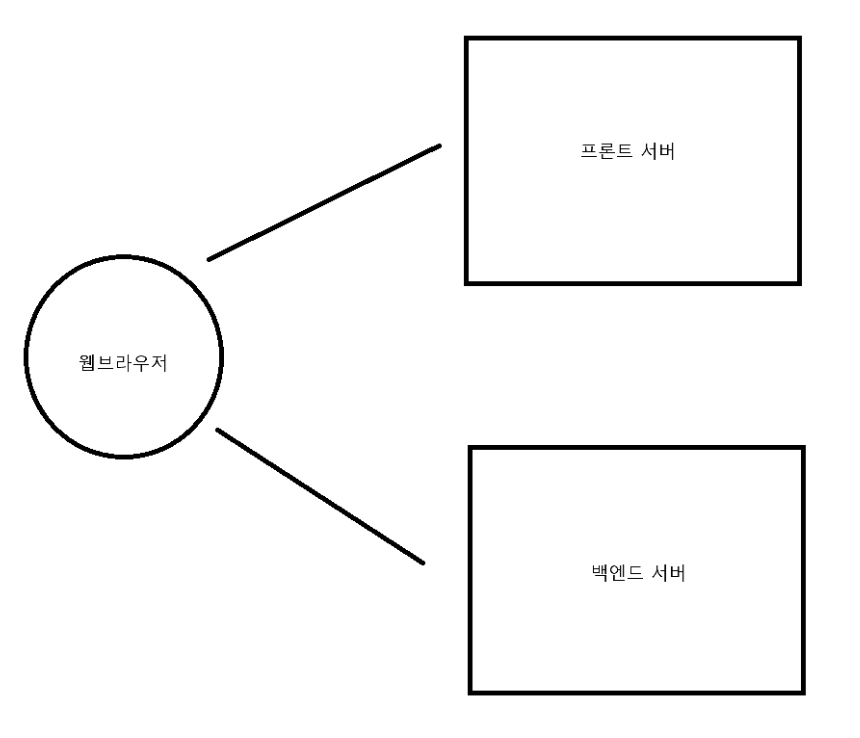
CORS 설정을 하기 위해선 시큐리티 설정과 웹 MVC 설정을 모두 해줘야 한다.
@Bean
public SecurityFilterChain securityFilterChain(HttpSecurity http) throws Exception {

    //CORS 설정
    http
            .cors(cors -> cors
                    .configurationSource(new CorsConfigurationSource() {
                        @Override
                        public CorsConfiguration getCorsConfiguration(HttpServletRequest request) {
                            CorsConfiguration configuration = new CorsConfiguration();

                            configuration.setAllowedOrigins(Collections.singletonList("http://localhost:3000"));
                            configuration.setAllowedMethods(Collections.singletonList("*"));
                            configuration.setAllowCredentials(true);
                            configuration.setAllowedHeaders(Collections.singletonList("*"));
                            configuration.setMaxAge(3600L);

                            configuration.setExposedHeaders(Collections.singletonList("Authorization"));

                            return configuration;
                        }
                    }));
(시큐리티를 안쓰더라도 CORS 설정은 해야한다.)
@Configuration
public class CorsMvcConfig implements WebMvcConfigurer {

    @Override
    public void addCorsMappings(CorsRegistry corsRegistry) {
        corsRegistry.addMapping("/**")
                .allowedOrigins("http://localhost:3000");
    }
}
참고 자료 & 이미지 출처
https://www.devyummi.com/page?id=668cfe58d3b43a6241eb6b6c
개발자 유미 | 커뮤니티
www.devyummi.com
JWT.IO
JSON Web Tokens are an open, industry standard RFC 7519 method for representing claims securely between two parties.
jwt.io
https://spring.io/projects/spring-security
Spring Security
Spring Security is a powerful and highly customizable authentication and access-control framework. It is the de-facto standard for securing Spring-based applications. Spring Security is a framework that focuses on providing both authentication and authoriz
spring.io
'Spring > Spring Security (feat. JWT, OAuth2)' 카테고리의 다른 글
| 스프링 OAuth2 Client (세션 방식, SSR 구조) (0) | 2024.11.14 |
|---|---|
| 스프링 JWT 심화 (0) | 2024.11.14 |
| 기타 : 메소드 시큐리티, 연동(웹 MVC, 타임리프, 스프링 데이터 JPA) (1) | 2024.11.10 |
| 내부 구조 - Security Filters (0) | 2024.11.02 |
| 내부 구조 - Authorization (인가) (0) | 2024.11.02 |


